
How to keep cold email bounce rate under 2%.
No database can promise zero bounces. A reliable system does something more useful: it removes known failures before sending, isolates uncertain addresses, and stops new failures from damaging the rest of the campaign.
By Argorant
Reviewed and updated August 20, 2026 by Argorant
Treat under 2% as an internal operating target, not a guarantee or a Gmail rule. Authenticate every sender, verify each address close to the send, allow only valid contacts into the primary campaign, separate catch-all and unknown results, suppress hard bounces immediately, and slow down when provider responses deteriorate. If a vendor mixes all five status classes into one export, you cannot control the risk.
Start with the denominator
Bounce rate is bounced messages divided by attempted deliveries. That sounds obvious, but dashboards often mix hard bounces, soft bounces, blocks, deferrals, and policy rejections. Diagnose them separately. A nonexistent mailbox is a list-quality failure. A temporary 4xx response may be a capacity or reputation problem. An authentication rejection is infrastructure. Fixing copy cannot repair any of those causes.
Use a rolling view by sending domain, mailbox provider, campaign, and data source. A blended account-level average can hide one damaged domain behind several healthy ones. For a campaign with 2,000 attempts, a 2% rate is 40 bounces. If one domain produces 28 of them, the action is not to rewrite every message; it is to stop that domain, inspect its audience and SMTP responses, and protect the others.
The five statuses must remain separate
“Verified” is useful only when you can see what the verifier decided. A single export labeled “verified contacts” may still contain catch-all or unresolved rows. The campaign gate should operate on the verdict, not the filename.
| Status | What it means | Campaign action |
|---|---|---|
| Valid | The address passed the current verification checks. | Primary lane, subject to campaign fit and consent/legal review. |
| Catch-all | The domain accepts the probe without confirming that mailbox. | Separate, lower-volume lane only when account value justifies the risk. |
| Unknown | The verifier could not reach a confident result. | Do not place in the primary campaign; retry later or use another channel. |
| Invalid | The mailbox or domain produced a definitive failure. | Suppress. Never send. |
| Suppressed | The address or domain is blocked by prior bounce, opt-out, complaint, or policy. | Never send unless a documented, lawful reason explicitly removes the suppression. |
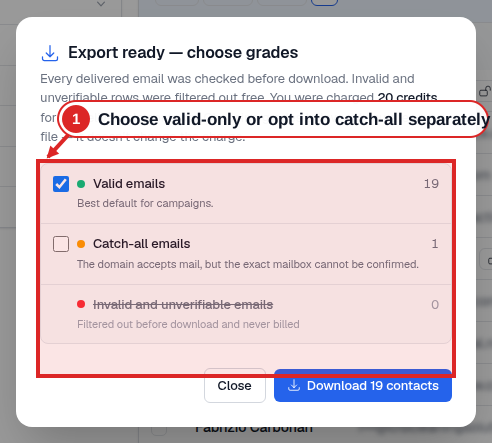
- 1Choose valid-only or opt into catch-all separately
The export summary keeps valid and catch-all results separate and shows filtered invalid or unverifiable rows before download.
A data source that “doesn’t bounce” does not exist
Mailboxes change after any database records them. Some receiving systems deliberately avoid confirming whether a mailbox exists. Others accept during an SMTP conversation and reject later. That means a valid result is a recent risk assessment, not a permanent property of the contact.
Evaluate a provider on the workflow it gives you: when verification runs, whether invalid results consume credits, whether catch-all and unknown are exposed, whether old saved contacts are checked again, and whether the export can be restricted to valid-only. Run the same frozen company-and-title sample through every provider. Count usable rows after verification and price that result, not the advertised database size.
Authenticate before you interpret campaign results
Google requires all senders to personal Gmail accounts to use SPF or DKIM, valid forward and reverse DNS, TLS, and standards-compliant messages. Senders near or above 5,000 Gmail messages in a day must use both SPF and DKIM, publish DMARC, and align the visible From domain with SPF or DKIM. Google recommends keeping the Postmaster Tools spam rate below 0.10% and avoiding 0.30% or higher. These are spam-complaint metrics, not bounce-rate thresholds.
Yahoo likewise requires authentication for bulk senders and warns that sudden volume spikes can look like a compromised sender. Both providers emphasize controlled volume and wanted mail. Authentication proves who sent the message; it does not make an unwanted or badly targeted message acceptable.
Build the campaign gate before scheduling
The safest architecture is simple: source → deduplicate → verify → classify → policy gate → sequencer. Only rows with a current valid verdict and no suppression event pass automatically. Catch-all and unknown never inherit the valid lane. An opt-out, complaint, or hard bounce writes a durable suppression that every future campaign checks before enrollment.
Cache verdicts so the same contact is not needlessly rechecked moments later, but do not turn the cache into a claim that email remains valid forever. Store the verdict, provider, timestamp, reason code, and campaign outcome. Reverification policy can then respond to age and observed risk instead of relying on a universal “data decays X% per month” statistic.
Ramp volume from observed responses, not folklore
Google advises senders to begin at low volume, increase gradually, avoid bursts, monitor server responses and reputation, and reduce volume when messages begin bouncing or being deferred. It does not publish a universal “30 emails per inbox” number. Your safe rate depends on the provider, account age, prior traffic, recipient response, and the similarity of the messages.
Establish a conservative baseline, keep the daily shape consistent, and raise one variable at a time. If bounces, 4xx deferrals, complaints, or reply quality deteriorate, pause the increase. Scaling by adding more identical low-quality traffic does not solve the cause; it distributes the damage.
Preflight checklist
SPF and DKIM pass; DMARC exists and the visible From domain aligns.
Only recently checked valid work emails enter the primary lane.
Catch-all and unknown are isolated; invalid, suppressed, and opted-out rows cannot send.
New domains ramp gradually; sudden spikes and large catch-up batches are avoided.
Hard bounces suppress immediately; deferrals and reputation are monitored by domain.
The sender is identifiable, the message is relevant, and opting out is straightforward.
What to do when the rate rises
- Pause the affected lane. Do not keep sending while diagnosing.
- Split the response codes. Separate invalid mailbox, domain failure, policy block, rate limit, and temporary deferral.
- Find concentration. Compare sending domain, mailbox provider, campaign, source, geography, and verification age.
- Suppress definitive failures. Hard bounces and opt-outs must be durable across campaigns.
- Reverify the remaining queue. Do this before resuming, not after another batch.
- Resume below the previous rate. Increase only after the response-code mix normalizes.
Frequently asked questions
No. A valid verdict is a point-in-time risk signal, not a permanent guarantee. Mailboxes can close, policies can change, and some domains accept mail during verification but reject it later. The practical goal is to minimize preventable bounces and contain the rest.
No. Under 2% is a conservative operating target used by many outbound teams, not a published Gmail compliance threshold. Google publishes authentication, spam-rate, formatting, alignment, and volume-ramp requirements; it tells senders to reduce volume when bounces or deferrals rise.
Not by default. Keep catch-all addresses in a separate segment because the domain accepts the verification probe without confirming the individual mailbox. Send them only when the account value justifies the residual risk, and use a lower-volume lane.
Reverify as close to the send as practical, and always reverify older stored lists before reuse. There is no universal number of safe days: role changes, domain changes, source age, and your own bounce history should determine the interval.
Authentication, alignment, spam-rate, unsubscribe, monitoring, and volume-ramp requirements.
Current authentication, reputation, traffic-control, and sender requirements.
How valid, catch-all, and filtered rows are separated before download.
The mechanics and limits behind verifier verdicts.
Build the list around
deliverable output.
Separate valid contacts from catch-all, unknown, and invalid rows before the campaign starts.
