
Best Data Sources for AI SDR Agents
A reference architecture for AI SDR data, separating company coverage, people coverage, verification, CRM and suppression state, personalization evidence, and sender activation.
By Argorant
Reviewed and updated August 20, 2026 by Argorant
An AI SDR needs a pipeline, not one database. Use a source that can size accounts and people, verify work emails at the point of use, check CRM duplicates and suppressions, ground personalization in supported evidence, and pass only eligible records to a sender. Argorant can own search through verified export and directly push to selected systems, while Clay and sender tools remain orchestration and activation layers.
What works today
Each label shows how a path works today: a direct Argorant connection, a documented setup, a generic HTTP call, a CSV file, or something to check in your own account first.
Source and verification
DirectArgorant handles search, counts, preview, reveal, and exports that contain only valid emails.
Direct CRM handoff
DirectBuilt-in connections: HubSpot, Pipedrive, and Google Sheets.
Direct sequencer handoff
DirectBuilt-in connections: Smartlead, Instantly, and lemlist.
Other destinations
CSVFor Salesforce, use a CSV import or your own API workflow. Clay connects through its HTTP API step.
More sequencers
CSVOther sequencers work through a CSV export or the Argorant API today.
Step by step
- 1
Define the company universe
Translate the ICP into industry, geography, size, keyword, and exclusion filters, then count it.
Expected result: A measurable candidate market before contact spend. - 2
Select people
Choose roles and seniority, inspect a masked preview, and reject segments with weak relevance.
Expected result: A role-appropriate person layer. - 3
Apply eligibility
Require valid status, deduplicate against CRM, apply suppression lists, and retain evidence for the opening line.
Expected result: Only contactable, non-suppressed, supportably personalized records remain. - 4
Push to your sender
Push to Smartlead, Instantly, or lemlist with the destination campaign selected, or export for another destination, and log the response.
Expected result: One eligible lead enters one intended campaign once.
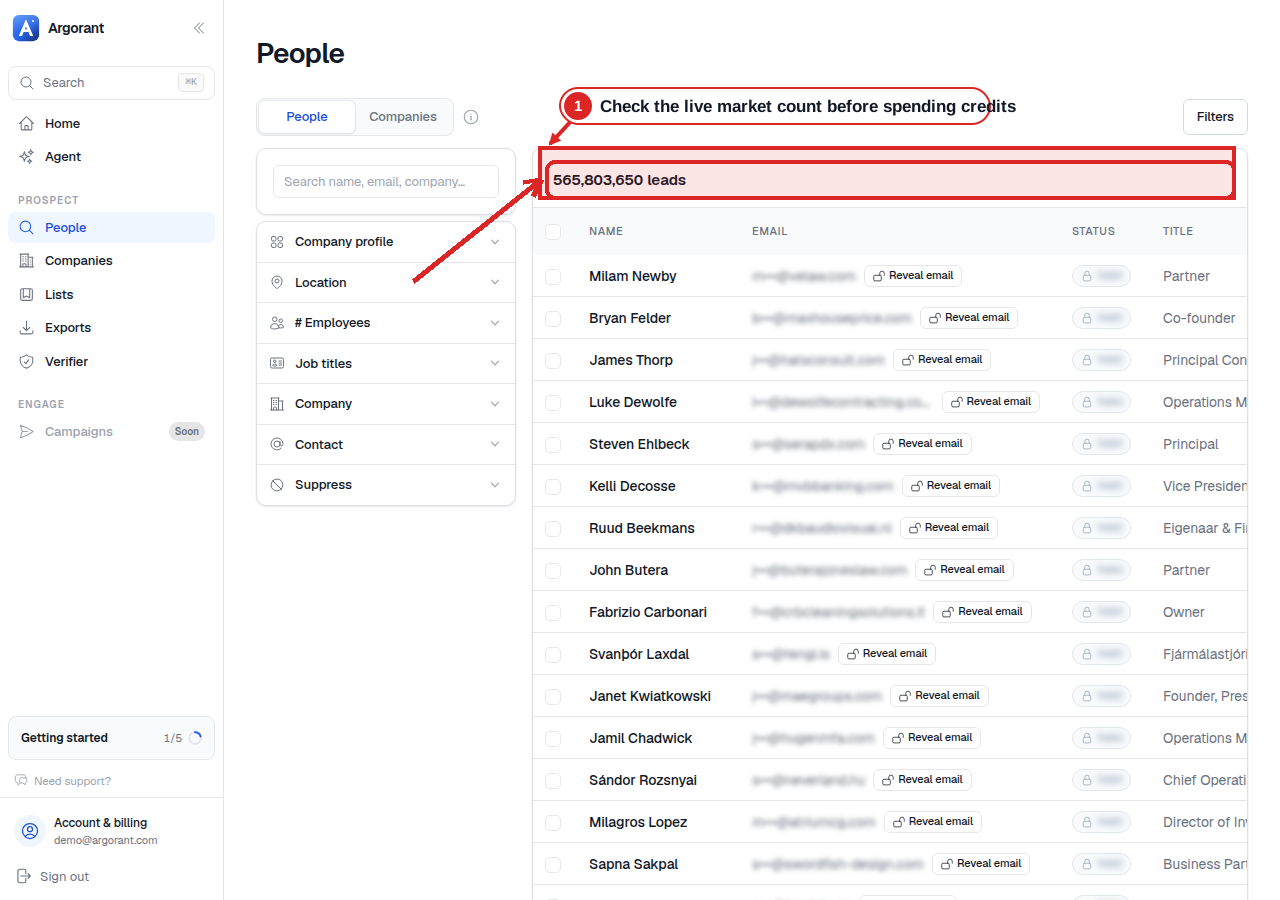
Inspect the market before a paid action
The result count comes first. It lets you or your agent check that the filters describe the right market before any contact is revealed or exported.
Plans, credits, and access gates
| Provider or layer | What to know | Published price |
|---|---|---|
| Argorant | Count and preview before reveal. You use credits only for contacts found, from your plan or a credit pack. | See the vendor's current pricing. |
| Clay | Data Credits and Actions are separate. Clay's public pricing lists HTTP API integrations on the Growth plan. | See the vendor's current pricing. |
| Smartlead, Instantly, and lemlist | Sender subscriptions and sending capacity are separate from contact-data cost. | See the vendor's current pricing. |
| Third-party databases | Measure the combined base plan, reveal, verification, API/MCP gate, and failed-output cost for 100 deliverable emails. | See the vendor's current pricing. |
Best fit by job
| Option | Best for | Access | Cost model | Verdict |
|---|---|---|---|---|
| Argorant | Contact data, email checks right before use, and direct pushes | UI, MCP, REST, CLI | Plan or credit-pack credits | Covers the data side; your sender tool does the sending. |
| Clay | Multi-provider orchestration and row logic | Tables and HTTP integrations | Data Credits plus Actions | Orchestration layer, not automatically the underlying source of truth. |
| Smartlead | Campaign execution | Direct Argorant push and API | Separate sender plan | Activation destination, not the primary contact database. |
| Instantly | Campaign execution | Direct Argorant push and API | Separate sender plan | Sending tool with a direct Argorant connection. |
| lemlist | Campaign execution | Direct Argorant push and API | Separate sender plan | The direct connection adds valid leads only and never starts sending. |
Frequently asked questions
Can one provider run the entire AI SDR?
A provider can cover several layers, but source data, CRM truth, suppression, evidence, and sending still have distinct failure modes. Keep those boundaries visible even when one UI connects them.
Should catch-all or unknown records enter a campaign?
Not if you only send to valid emails. Keep them in a separate list for review and send from your main domain only to emails marked valid.
Sources reviewed
Official product, developer, pricing, and policy pages reviewed on August 20, 2026. Prices and plans change, so check the vendor's current page before you buy.
10 sources checked and datedShow sources
Continue the workflow
Prove the workflow
before you scale it.
Count and preview first, then approve verified contacts with a clear spending limit.
