
Best Lead Generation Tools That Work Inside ChatGPT
A hands-on guide to connecting lead data inside ChatGPT, explaining the difference between remote MCP, directory plugins, custom GPT actions, prompt links and REST called by code. Check availability in your own workspace during setup.
By Argorant
Reviewed and updated August 20, 2026 by Argorant
Argorant, Apollo, ZoomInfo, Hunter, Lusha, Prospeo, and Seamless.AI document connector or MCP paths, but what counts is what actually installs in your ChatGPT account. Argorant fits best when you want to count and preview before paying for a small, approved reveal.
What works today
Each label shows how a path works today: a direct Argorant connection, a documented setup, a generic HTTP call, a CSV file, or something to check in your own account first.
Remote MCP in ChatGPT
DocumentedOpenAI requires public HTTPS Streamable HTTP, valid schemas, discoverable authentication, and testing in the actual ChatGPT surface.
Deep research read contract
DocumentedRead-only search and fetch tools provide the grounding contract for company-knowledge and research uses.
Argorant connector path
MCPConnect the public MCP endpoint at https://mcp.argorant.com/mcp. Which features appear depends on your ChatGPT plan, so check them in your own account.
Step by step
- 1
Open the supported connector surface
Use the current OpenAI setup flow for the target account instead of a generic prompt link.
Expected result: ChatGPT lists the server's real tools after authentication. - 2
Ground the market
Ask for a count and masked preview with explicit ICP filters.
Expected result: The answer contains tool-backed results rather than invented names. - 3
Approve the output
Request a small reveal or export and observe confirmation, masking, and credit behavior.
Expected result: A charged action occurs only with visible user intent. - 4
Audit and disconnect
Compare your Argorant usage history with the conversation, then remove the connector.
Expected result: Every output and charge is attributable and access can be removed.
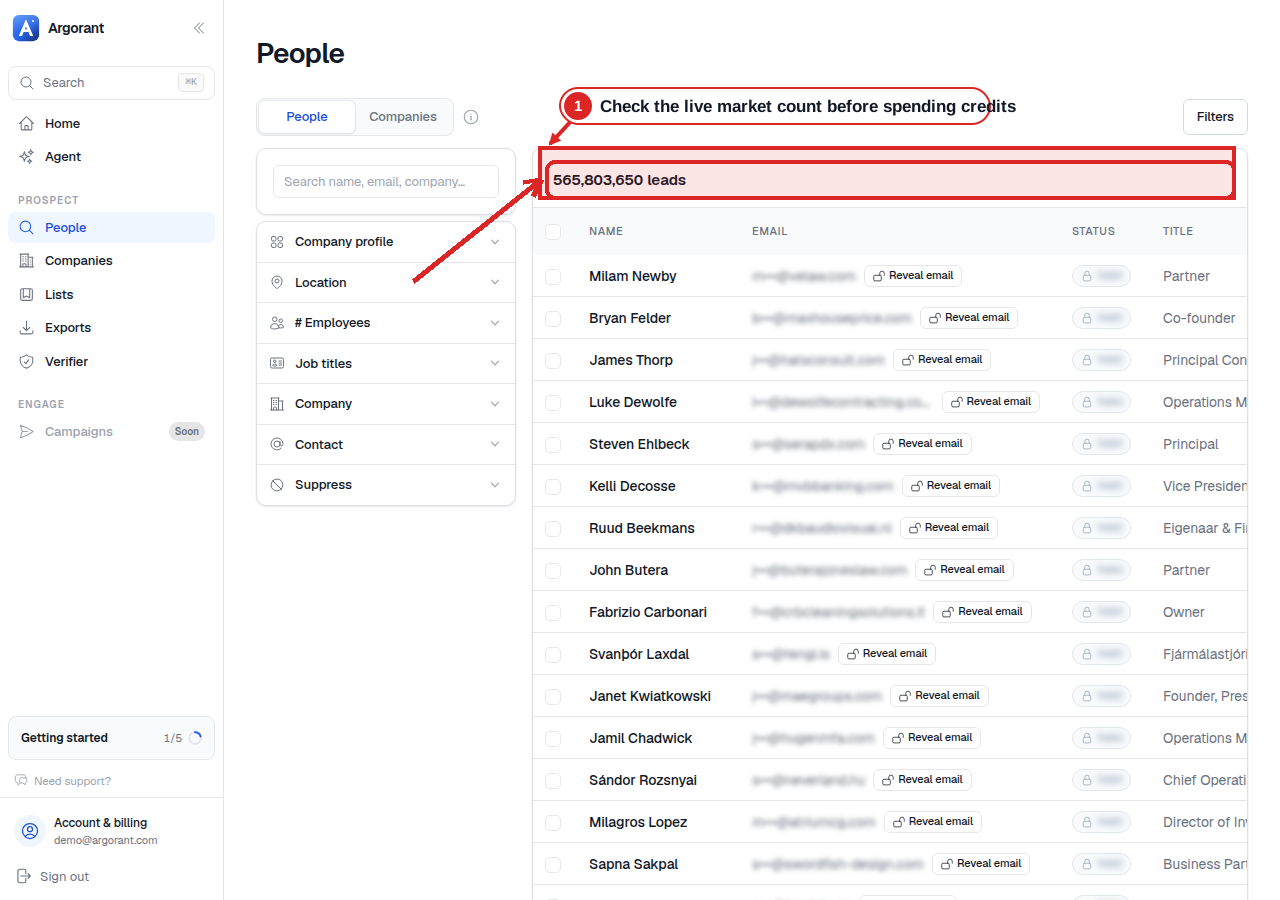
Inspect the market before a paid action
The result count comes first. It lets you or your agent check that the filters describe the right market before any contact is revealed or exported.
Plans, credits, and access gates
| Provider or layer | What to know | Published price |
|---|---|---|
| ChatGPT | Plan and feature availability can change. Check your own account against OpenAI's current documentation. | See the vendor's current pricing. |
| Argorant | Uses plan credits or one-time credit packs from $0.035 per contact. Search, counts, and previews cost nothing. | See the vendor's current pricing. |
| Apollo | Apollo's documentation says your plan limits also apply in MCP, including on the Free plan. | See the vendor's current pricing. |
| Hunter and Lusha | Free plans do not make enrichment unlimited; ordinary provider credits still apply. | See the vendor's current pricing. |
| LeadIQ | Not ranked here: its official connector page covers Claude, not ChatGPT. | See the vendor's current pricing. |
Best fit by job
| Option | Best for | Access | Cost model | Verdict |
|---|---|---|---|---|
| Argorant | Conversational TAM, preview, and verified output | Remote OAuth MCP | Plan or prepaid output credits | Count and preview for free, then approve paid reveals in the chat. |
| Apollo | Broad prospecting workflows | Official remote MCP | Existing account limits and credits | Documented option; try the same prompt in your own account. |
| Hunter | Focused email discovery | Remote MCP | Normal plan credits | Clear narrower option included across Hunter plans. |
| ZoomInfo | Enterprise data and research | Official MCP | Contract dependent | Check ChatGPT availability and your contract rights. |
Frequently asked questions
Does a ChatGPT prompt link count as an integration?
No. It preloads text but does not authenticate ChatGPT to a live data source. Label remote MCP, directory app, custom action, and prompt link separately.
Can ChatGPT safely buy contact data?
It can use a paid tool if your client and login allow it. Use a small prepaid balance, narrow permissions, and explicit confirmation, then compare every charge with your usage history.
Sources reviewed
Official product, developer, pricing, and policy pages reviewed on August 20, 2026. Prices and plans change, so check the vendor's current page before you buy.
10 sources checked and datedShow sources
Prove the workflow
before you scale it.
Count and preview first, then approve verified contacts with a clear spending limit.
