How to build a B2B lead list.
A lead list is a hypothesis about who buys from you, written in filters. Here’s the full workflow, from ICP definition to a verified file in your sequencer, and how to run it without wasting a credit.
By Argorant
Reviewed and updated August 20, 2026 by Argorant
Step 1: Define the ICP before opening any tool
The most common list-building failure happens before the first search: targeting “companies that could conceivably use this” instead of companies that demonstrably do. Start from evidence. Pull your last twenty closed-won deals and write down what they share: industry, headcount band, geography, the title that signed, the title that championed. If you’re pre-revenue, use your closest competitor’s public customers as a proxy. The output should be one or two sentences with no adjectives: “Logistics and freight companies, 50–500 employees, in DACH and Benelux, where the buyer is a Head of Operations or COO.”
Be equally explicit about exclusions, including agencies, nonprofits, companies below a headcount floor, countries you can’t legally sell into. Exclusions are what keep a list tight when the filters get broad.
Step 2: Translate the ICP into firmographic filters
Now convert each clause of the ICP sentence into a database filter: industry, employee range, country or region, and a title or seniority pattern for the contact layer. Industry is where translations go wrong, because most databases are built on classification codes that don’t match how you think about a market. “Logistics” might be one label or a dozen adjacent ones, such as freight forwarding, warehousing, last-mile delivery, customs brokerage. Search the industry taxonomy by what you sell to, in plain words, and inspect a sample of matching companies before trusting any filter. Ten minutes of spot-checking company names saves a thousand mistargeted sends.
For titles, write patterns rather than exact strings. The same buyer is a “Head of Operations” at one company, a “VP Ops” at another, a “COO” at a third. Decide consciously whether you want decision-makers, champions, or both, and keep them in separate segments so the messaging can differ.
A worked example: from one sentence to a testable segment
Suppose you sell route-planning software to European logistics operators. The sentence is not the list. The list appears only after each part of the sentence has a database rule and an explicit rejection rule.
| Decision | Example rule | What to inspect |
|---|---|---|
| Accounts | Freight, warehousing, last-mile; 50 to 500 employees; DACH and Benelux | Ten known-good and ten random companies |
| Buyers | COO, VP Operations, Head of Operations, Operations Director | Current title, department, seniority, and company |
| Exclusions | Agencies, consultancies, software vendors, sub-50 employee firms | False-positive rate in a 50-company sample |
| First batch | 500 valid-only work emails, no catch-all addresses | Deliverable rows, duplicates, missing titles, and segment fit |
Do not widen the universe because the first count looks small. Find the cause first. Industry mapping may be too narrow, title logic may miss abbreviations, or the actual market may simply be small. Each cause implies a different correction.
Step 3: Size the market before spending credits
Before exporting anything, look at the count. Every decent platform will tell you how many companies and contacts match your filters without charging you for the answer, and that number is a sanity check on your entire strategy. If your “tight ICP” returns 400,000 contacts, your filters are vaguer than your ICP. tighten until the count looks like a market you could actually work. If it returns 800, you’ve discovered something more important than a list-building problem: your addressable market may not support your pipeline math, and it’s far better to learn that from a count than from a quarter of missed quota.
Counts are also how you compare data vendors honestly: run the same real-world filter set on each and see who actually covers your market, not who claims the biggest global number. (More on that in our provider comparison guide.)
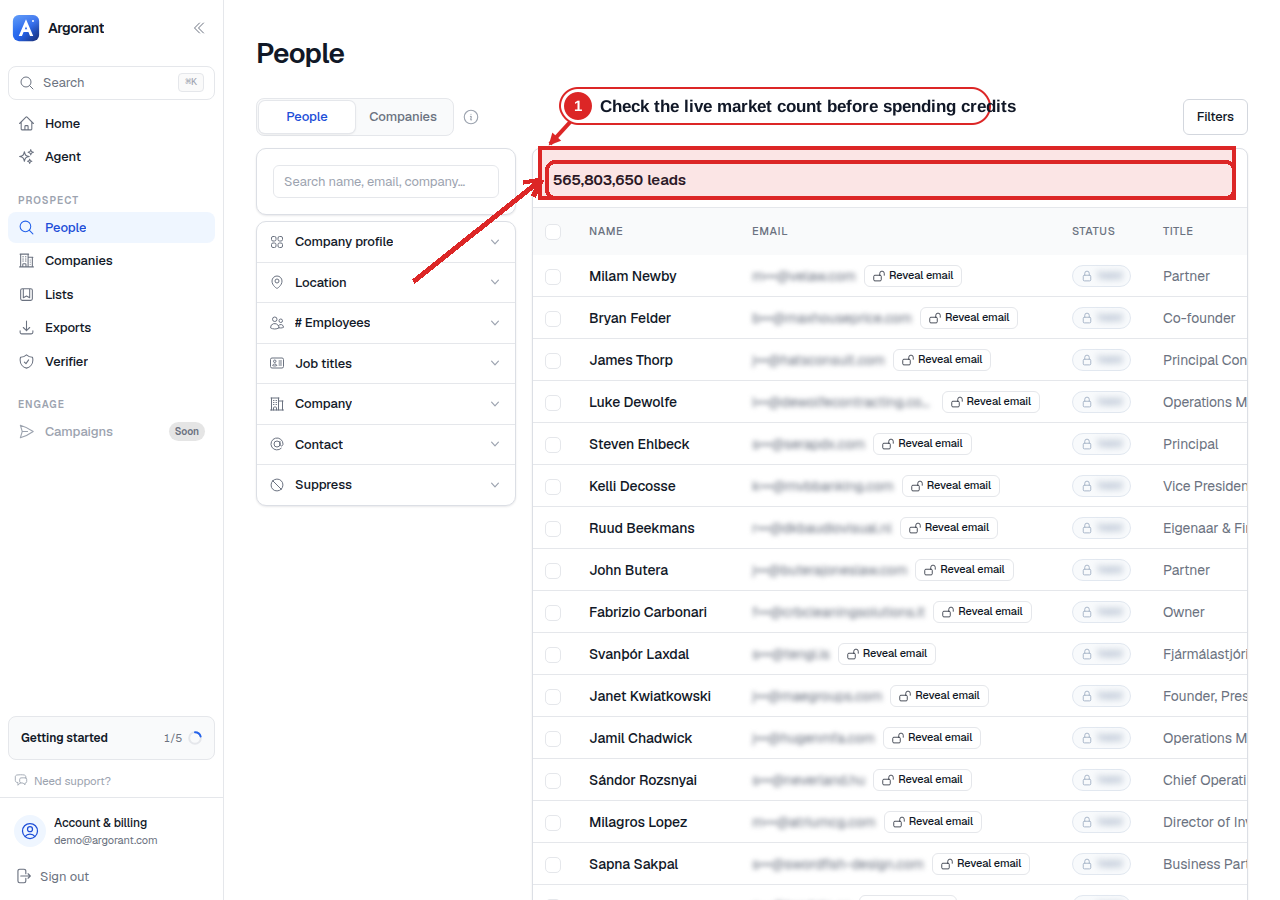
- 1Check the live market count before spending credits
Argorant shows the matching people count before a buyer reveals or exports contact data.
Step 4: Prioritize segments, don’t export the universe
Resist the temptation to pull the whole matching set at once. Slice the market into segments by industry vertical, country, and headcount band, then rank them by expected fit. Export the best segment first, at a size your sending infrastructure can actually consume in two or three weeks (for most teams, 500–2,000 contacts). This does three things: it keeps your cost matched to your sending capacity, it gives you a feedback loop (reply rates by segment tell you where to spend next), and it means a messaging mistake burns one segment instead of the whole market.
Step 5: Verify before anything reaches a sender
An unverified list converts bounce risk into sender-reputation damage, and reputation damage outlives any single campaign. The rule: no address enters your sequencer without a recent verification verdict, ideally a live SMTP probe rather than a stamp the vendor applied months ago at collection. On Argorant this step is built into the export itself: every address is probed at the moment you download, invalid rows are filtered out and cost zero credits, and catch-all domains are a separate opt-in rather than silently mixed into “valid.” Because the check happens at export, the verdict always reflects the mailbox’s current state. The full methodology is documented in how we verify.
If you build lists from other sources, the principle stands: budget for verification as a mandatory line item and re-check close to the moment of use. Google’s sender guidelines also require domain authentication and recommend monitoring spam rate and reputation as volume increases. A clean list does not replace SPF, DKIM, DMARC, opt-out handling, or controlled sending volume. See the Gmail sender guidelines.
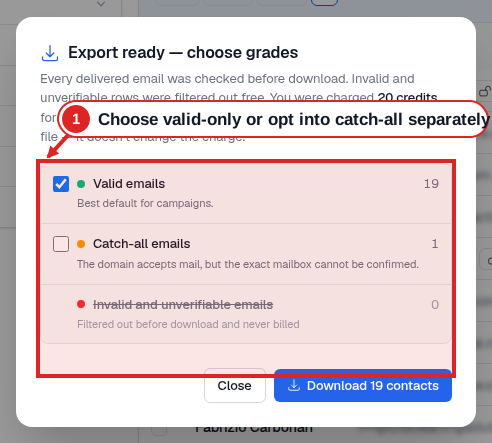
- 1Choose valid-only or opt into catch-all separately
The export summary keeps valid and catch-all results separate and shows filtered invalid or unverifiable rows before download.
Step 6: Enrich for personalization, not for hoarding
Enrichment means attaching context to a contact: company size, location, industry, the fields your copy will actually reference. The discipline is to enrich only what you’ll use. A first-touch email realistically uses four or five fields: name, title, company, industry, maybe city or a size band. Forty columns of unused firmographics don’t improve reply rates; they bloat your CRM and complicate your compliance posture. Article 5 of the GDPR requires personal data to be adequate, relevant, limited to what is necessary, accurate, and kept up to date. Export the fields your sequences reference, and let the database remain the system of record for the rest. Read the official GDPR text.
Step 7: Export to your sequencer or CRM
Map fields explicitly when you import, especially custom variables your sequences use, because a broken merge field (“Hi {{first_name}}”) is the fastest way to torch a segment. Dedupe against your CRM and your suppression list before anything goes live: existing customers, open opportunities, people who previously opted out. And keep provenance. Tag every imported contact with its source segment and export date, so that when replies come in you know which hypothesis is working and when a contact’s verification verdict ages out.
Step 8: Refresh based on time and evidence
A list becomes stale for several reasons: people change jobs, companies change size, mailboxes disappear, and your ICP evolves. There is no honest universal monthly decay rate for every segment. Store the export date and verification time, re-verify before reuse, re-run saved searches on a fixed cadence, and compare the delta. Retire a segment when titles, deliverability, or relevance have materially deteriorated instead of relying on an arbitrary age alone.
The modern variant: let an agent run the loop
Everything above is also expressible as a conversation. Argorant ships an MCP server and API on every paid plan, plus a CLI on npm (npx argorant), which means Claude, GPT, or your own agent can execute this exact workflow: describe the ICP in plain language, have the agent translate it to filters, check counts, compare segment sizes, preview samples, and only then trigger a verified export. The count-before-credits discipline becomes natural. The agent can iterate on filters for free and spend credits only on the final, sized, verified pull. If your team works in an AI-first stack, see how agents connect. If you’re pricing the workflow, plans start under $100/month. Teams that only need agent access can instead use the prepaid wallet at $0.035 per contact with no subscription. See pricing.
Your ICP is a filter set.
Run it.
Search 626.5M contacts in 202 countries, check counts for free, and build a personalized 25-lead sample.