
You advise owners of family businesses on succession. Handing over to the next generation or to management, bringing in a partner, or selling part or all of the company when the time is right. Your best conversations start years before any deal, with an owner who has not told anyone yet that they are thinking about it. That makes this the most delicate use case in the Academy. The list is small, the tone is everything, and the email never suggests that the business is for sale.
- A saved list of about 1,500 owners, founders, chairmen and managing directors of family-owned UK companies with 11 to 200 employees.
- A campaign of three short, discreet emails in one thread, each referring to the history of that business.
- A slow sending pace over six weeks, and a subsequence that answers every yes with a confidential call.
Step 1. Write the sentence first
Ours is this. "Owners and managing directors of family-owned manufacturers, wholesalers, builders, hauliers and food producers in the UK with 11 to 200 employees." Each part rules something out. Family-owned rules out companies already held by investors. The size band keeps you in the range where the owner still runs the business day to day. The industries are the ones where succession is a real question, because the business is asset-heavy and hard to hand over.
Step 2. Set the filters
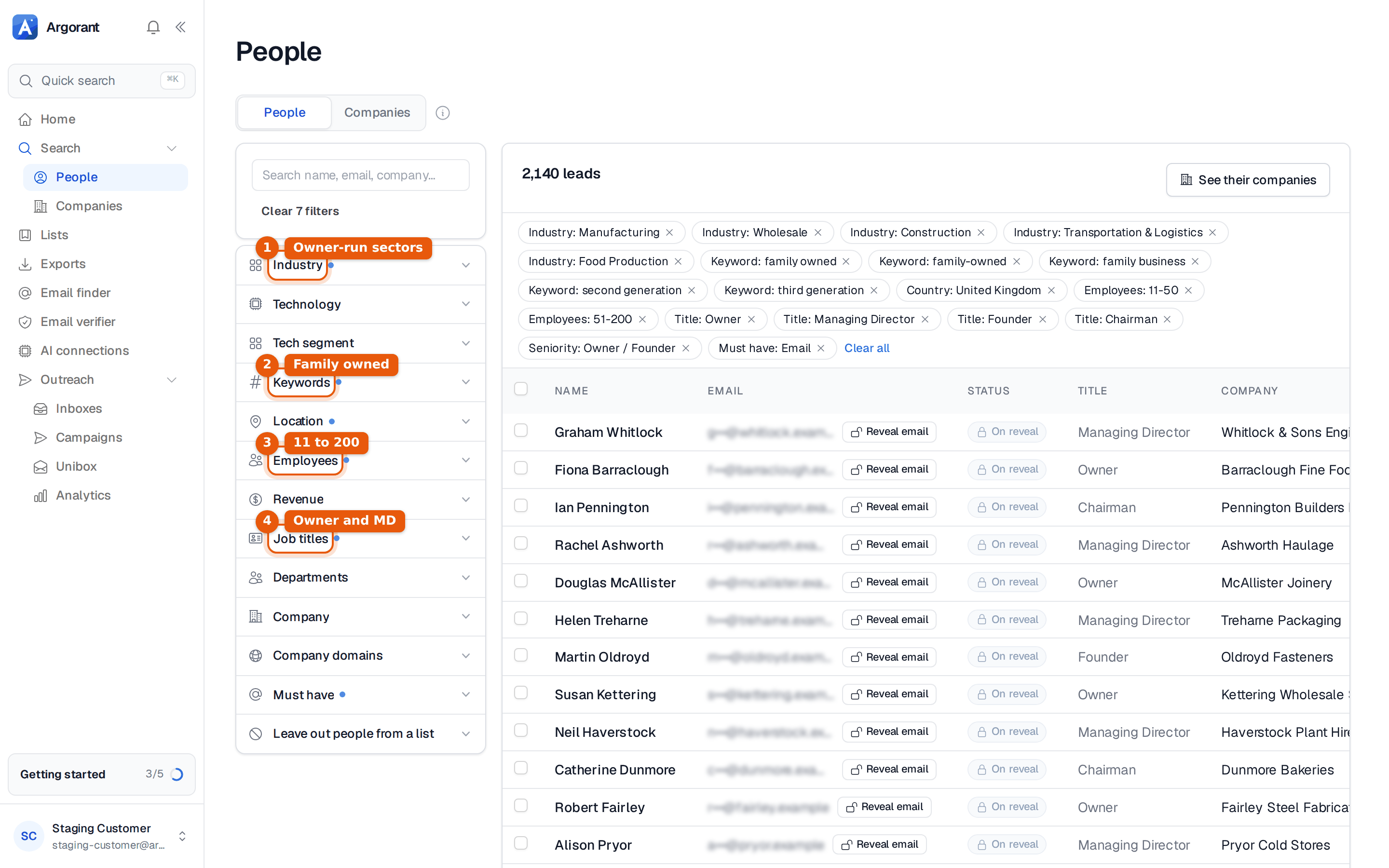
Open Search, then People. Two filters do the real work here, seniority and keywords.
| Filter | Value | Why |
|---|---|---|
| Location | United Kingdom | Your practice covers the UK. Leave regions open, Scotland and Wales count too. |
| Industry | Manufacturing, Wholesale, Construction, Transportation & Logistics, Food Production | Sectors with many owner-run firms and real assets to hand over. |
| Employees | 11-50, 51-200 | Big enough to have value beyond the owner, small enough that the owner decides alone. |
| Job titles, Seniority | Seniority Owner / Founder, titles Owner, Managing Director, Founder, Chairman | In a family firm the owner is often the Chairman and a son or daughter is the MD. Both belong on the list. |
| Keywords | family owned, family-owned, family business, second generation, third generation | Matches what the company says about itself. A firm that calls itself family-owned on its website is one where the family question exists. |
| Must have | Only people you can write to. |
Step 3. Read the count, then every row you can
This list is smaller than the others in the Academy, and it should be. Expect hundreds to a few thousand people, not tens of thousands.
- Above 8,000 means the keywords are not applied. Check the chips above the results.
- 500 to 3,000 is right. Plan a first wave of about 1,500 people and keep the pace slow.
- Under 300 means the keywords are too strict. Add "family run", "established in", "since 19" as further keywords, or widen to 201-500 employees.
With a list this small, read more rows than usual. You are looking for one thing, that the person owns or runs the business. A Managing Director at a subsidiary of a large group is not your reader, however well the company name sounds. Drop a company that is part of a group.
Step 4. Save the list, keep only valid emails
Click Select matching, choose how many people you want, then Save list. Name it UK - Family-owned mfg, wholesale, build, haulage, food 11-200 - Owner and MD. When you attach it to a campaign, include Valid only. A bounce costs you more here than anywhere, because you have fewer people to write to and every one of them matters. Each person from search costs 1 credit unless you already unlocked them.
Several people at one company may show up, for example the Chairman and the MD. Write to one of them, usually the older generation, and keep the other back. Two emails about succession arriving at the same family business on the same day is the fastest way to lose both.
Step 5. One line about their history
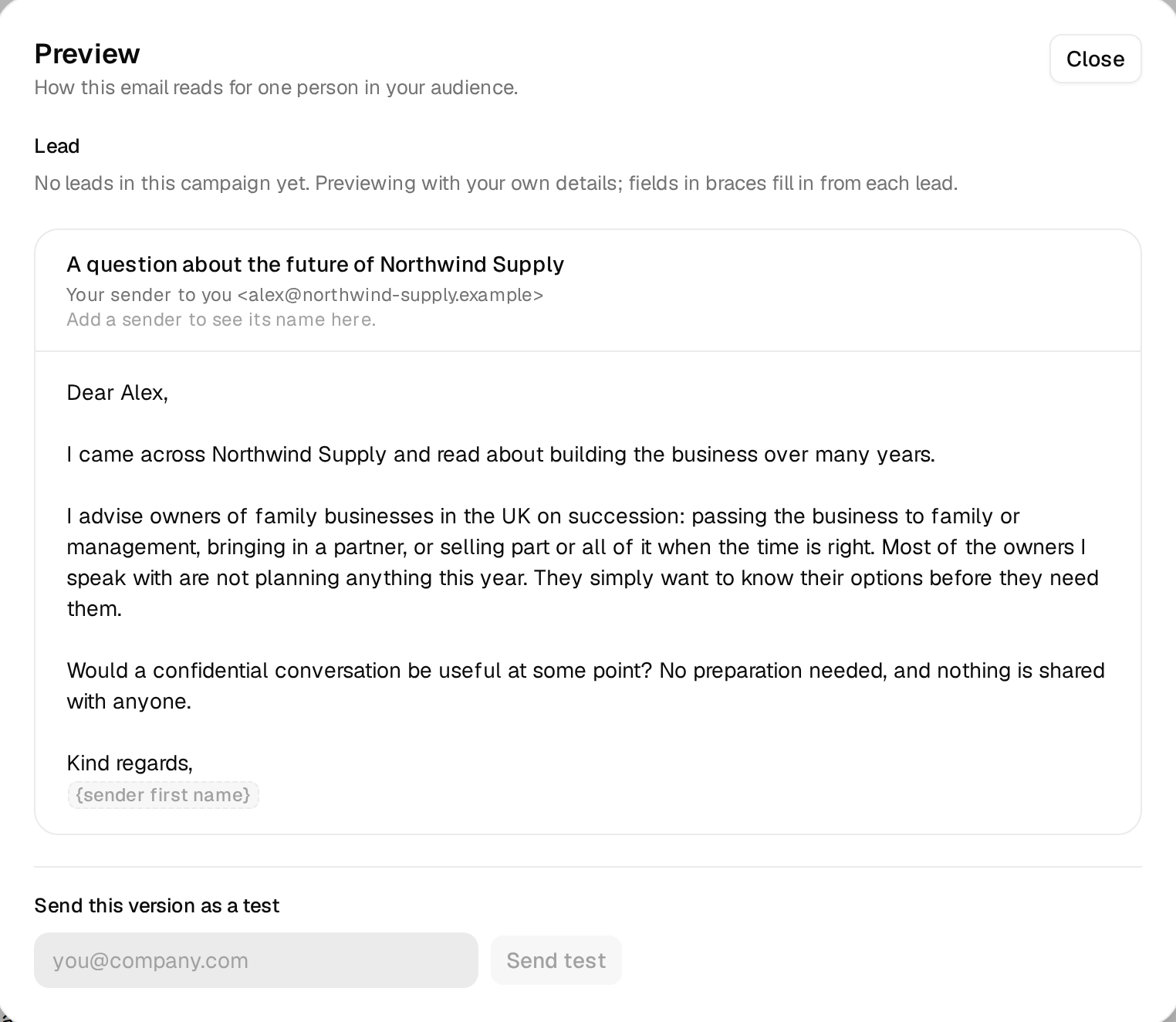
An owner reads an email about succession with suspicion. What earns trust is proof you know their business, not a compliment. The line goes into {{custom_history}} and sits in the sentence "I came across your company and read about [line]". It comes from the company's own About page. When it was founded, by whom, what the next generation changed.
For my campaign "Demo: UK family business owners", set up a personal line called custom_history.
It describes the history of the business from its own About page: when it was founded, by whom,
which generation runs it, how it grew. It fits after "read about", 6 to 14 words, UK spelling,
e.g. "running the firm your grandfather started in 1962".
Fallback: "building the business over many years".
Never mention a sale, a valuation or the owner's age. Show me five examples with the source first.| Company | Personal line | How the sentence reads |
|---|---|---|
| Whitlock & Sons Engineering | running the firm your grandfather started in 1962 | I came across your company and read about running the firm your grandfather started in 1962. |
| Barraclough Fine Foods | taking the bakery from one shop to supplying regional retailers | I came across your company and read about taking the bakery from one shop to supplying regional retailers. |
| Ashworth Haulage | growing the fleet as the second generation in charge | I came across your company and read about growing the fleet as the second generation in charge. |
| No line of its own | building the business over many years | I came across your company and read about building the business over many years. |
Be careful with the second person. "Your grandfather" is only right when the About page says so. If the page only says "family-owned since 1962", write "running a family firm that dates back to 1962" instead.
Step 6. The three emails
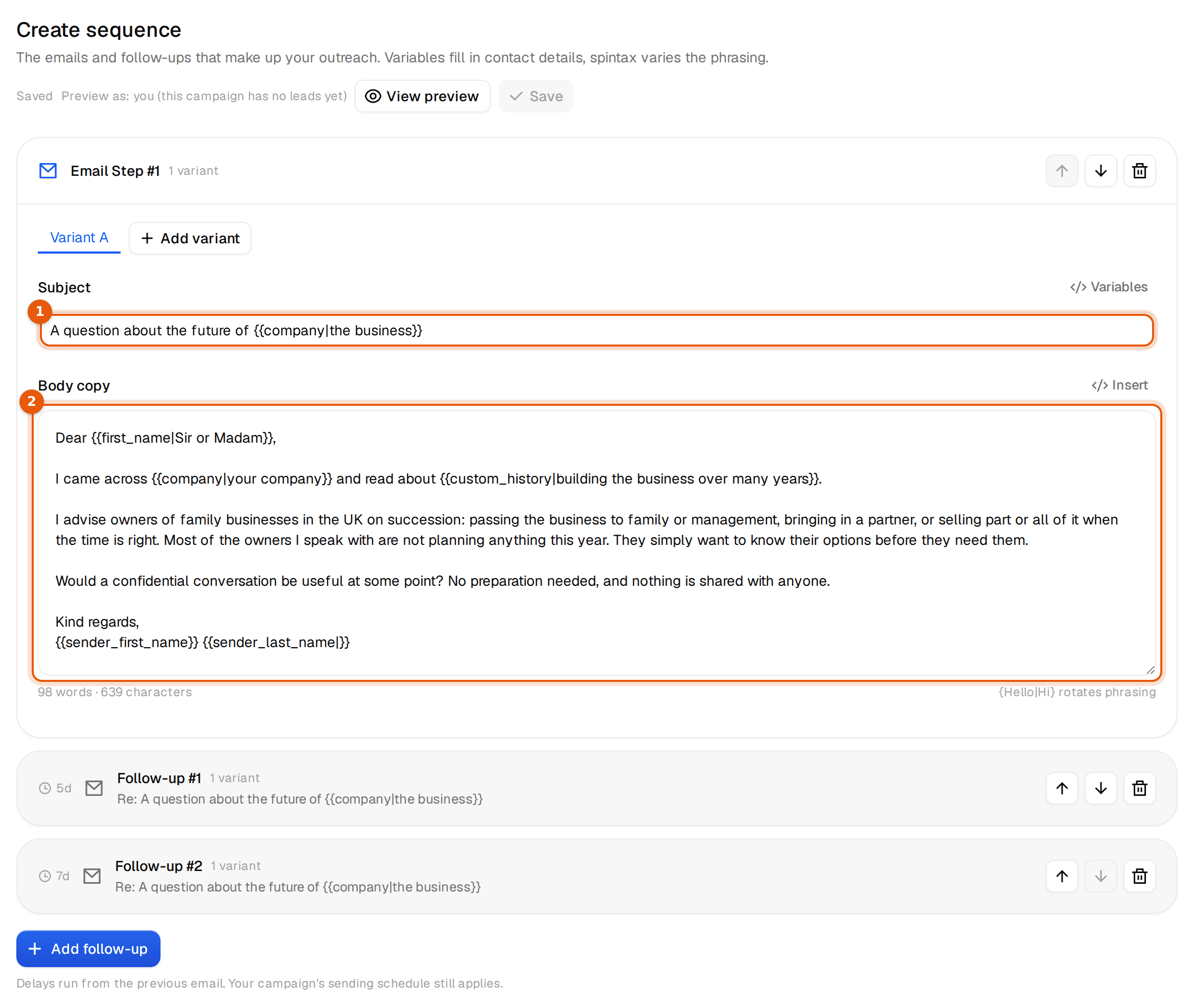
Press New campaign, attach the list and open Emails. Three rules shape the copy. Never say the business might be sold. Never mention age or health. Always offer a way to learn something without a call.
A real observation, who you are, and that most owners are not planning anything this year. That last sentence lowers the stakes enough for a reply.
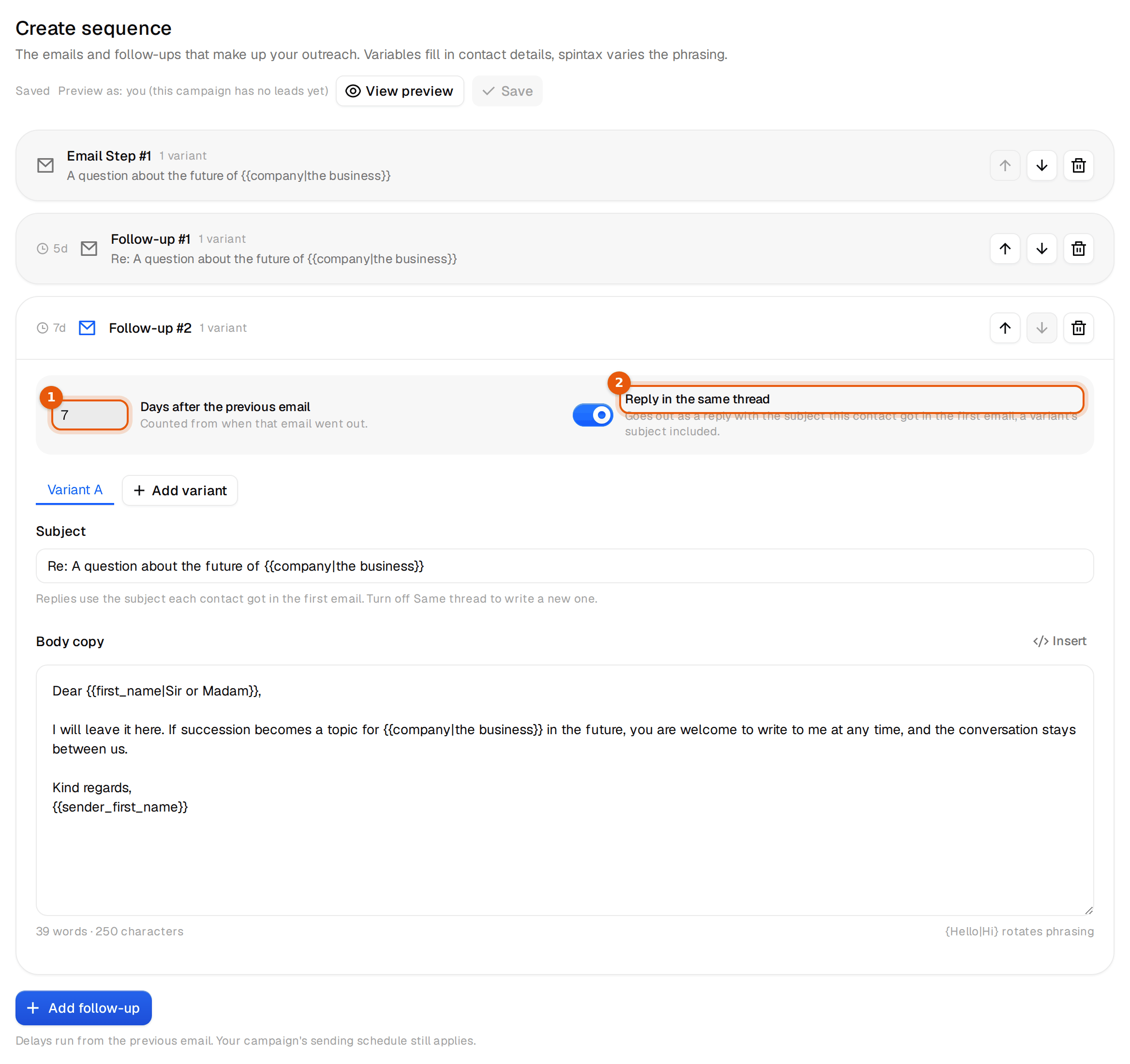
A smaller ask. A short note in writing suits owners who would never take a call from a stranger about this.
A clear end, and an open door that stays confidential. That matters for a decision that can take years.
Step 7. Mailboxes for 1,500 people in 6 weeks
Cold email never goes out from your main domain. It goes out from separate mailboxes on domains that look like yours, for example a short variation of your brand name. If one of them gets tired, you retire it and your real domain never notices.
Here is the math for this campaign. 1,500 people over 6 weeks is about 50 new people per weekday. Each gets three emails, so once the follow-ups overlap you send roughly 150 emails a day. At 5 cold emails per mailbox per day, that is about 30 mailboxes.
| Input | Value |
|---|---|
| New people per weekday | 50 |
| Emails per person | 3 |
| Emails per day once everything runs | about 150 |
| Cold emails per mailbox per day | 5 |
| Mailboxes | about 30 |
There are two ways to get there. Under Outreach, Inboxes you connect mailboxes you already have, from Google, Microsoft or any other provider. Or you have new Microsoft 365 mailboxes set up on new domains. Those come in bundles from 100 mailboxes, you do not need a plan to buy them, and they connect to your campaigns on their own. 100 mailboxes carry 500 cold emails a day, which leaves room for a second campaign.
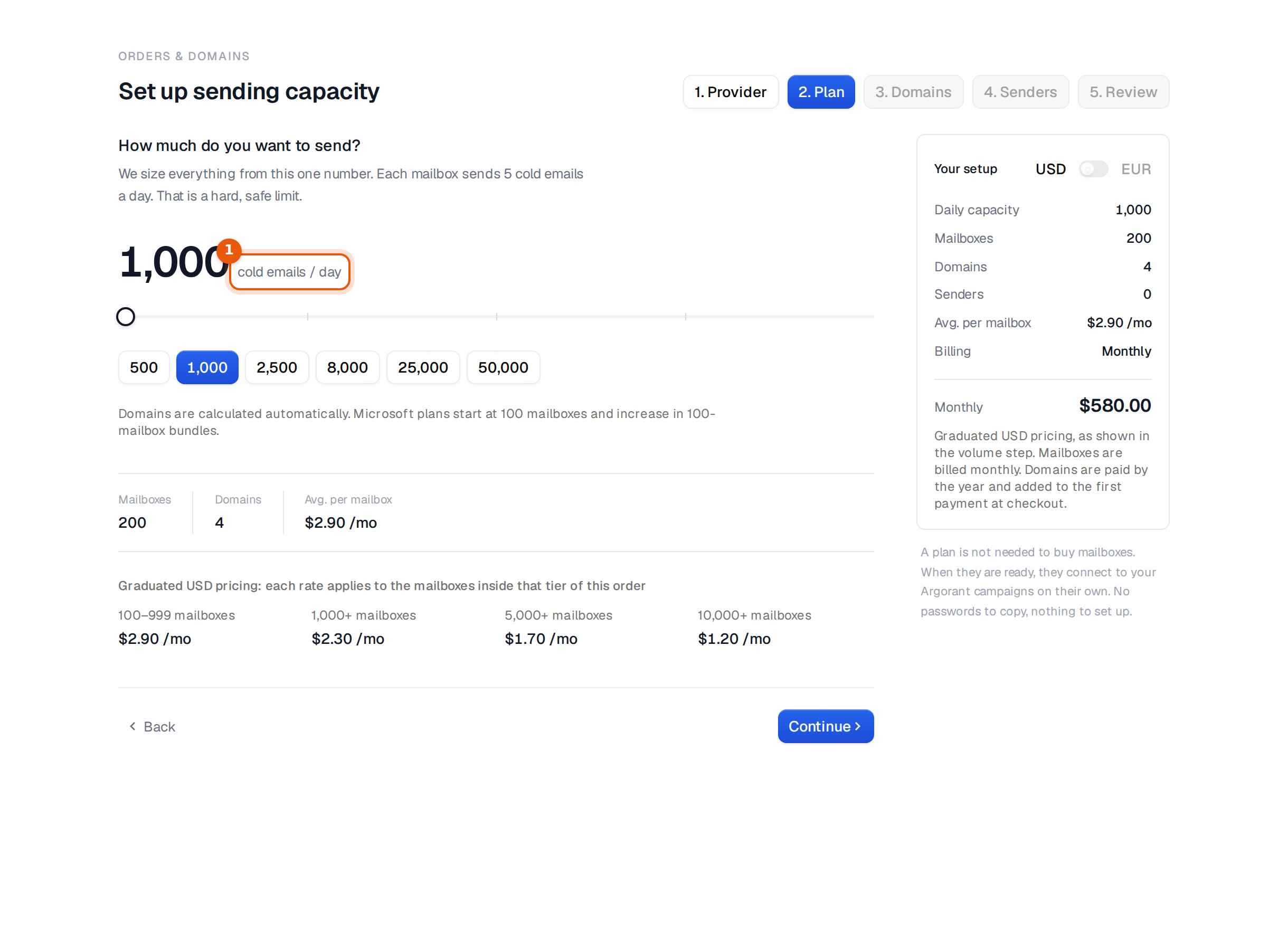
New mailboxes wait at least 24 hours before they send anything. Warm-up is included and starts switched off. Switch it on for new mailboxes and give them one to two weeks before full volume. Never raise the limit per mailbox to go faster. More mailboxes is the right lever.
For this audience the sender matters more than the volume. Use a sending domain close to your firm's name and a real person with a full name in the signature. Owners look you up before they reply.
Step 8. Schedule and launch
In the Senders step of the wizard, every connected mailbox is ticked. Untick the ones that belong to other campaigns or brands. Sends rotate across the ones you keep, and each one still respects its own daily limit.
In the Schedule step, set the timezone of the people you write to, here United Kingdom, not your own. Keep the sending window at 09:00 to 17:00, keep Skip weekends on and keep the gap between sends per mailbox at 60 to 120 minutes. Plain text stays on, so the email looks like it came from a person and carries no tracking pixel.
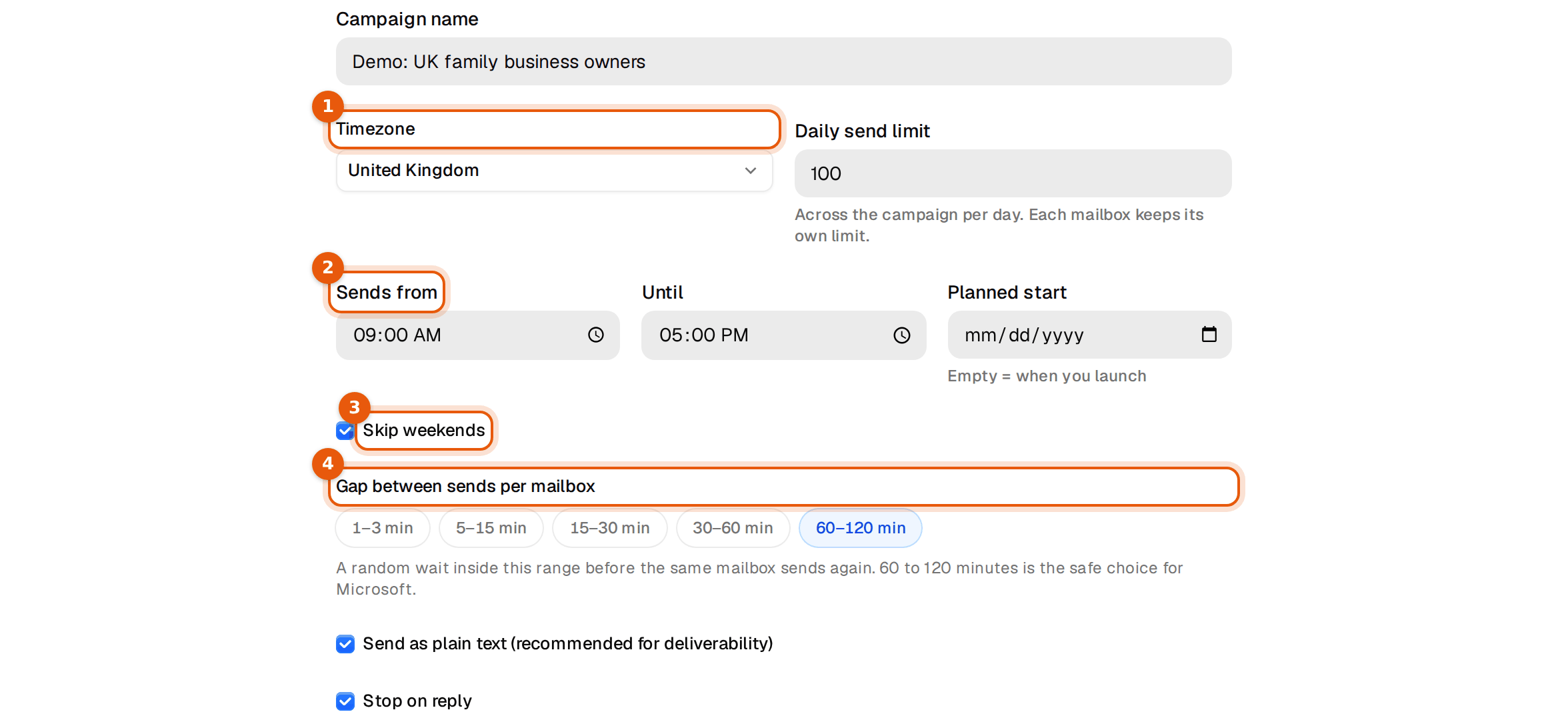
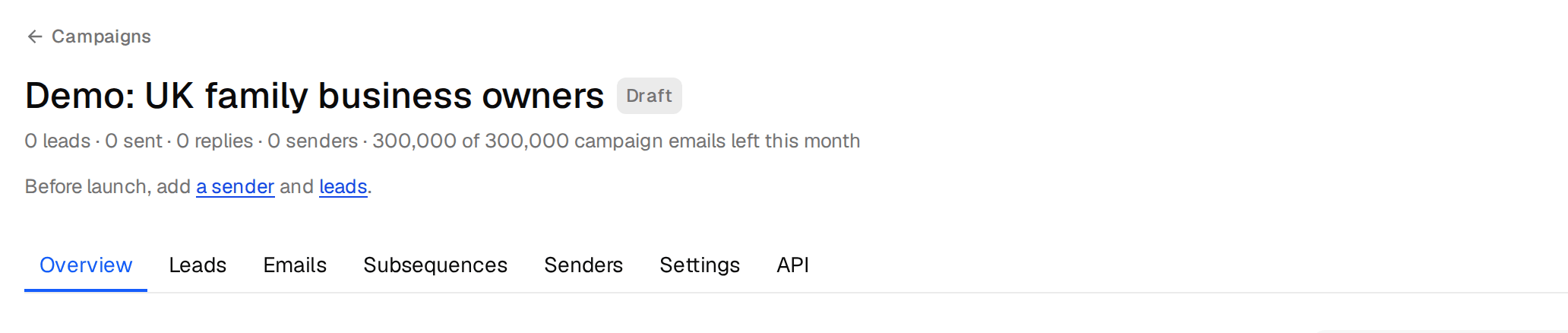
The last step is the review. Read it as if somebody else built the campaign. The audience with the grades you picked, the sequence with its waits, the senders, the start and the pace. Then press Launch campaign. Launch is not possible without senders and leads, and mailboxes still in their first day hold the launch until they are ready. Afterwards, open the Settings tab and check that Stop on reply and Bounce protection are on. Bounce protection pauses the campaign when more than 10% bounce once 100 people have been contacted.
Step 9. Replies and confidential calls
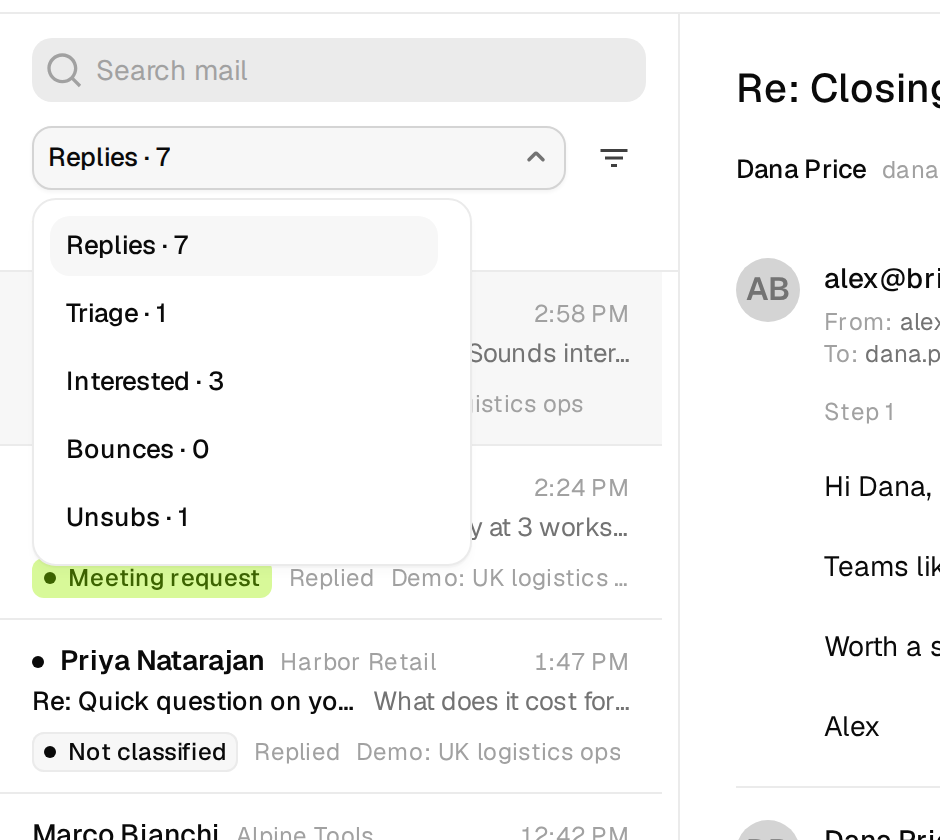
Every reply lands in the Unibox, from every mailbox and campaign, and gets a label on its own. The standard labels are Interested, Meeting request, Out of office, Unsubscribe and Other. Switch on Referral and Wrong person in the settings as well. On our own largest campaign, one in four human replies pointed us to a colleague, more often than a straight yes.
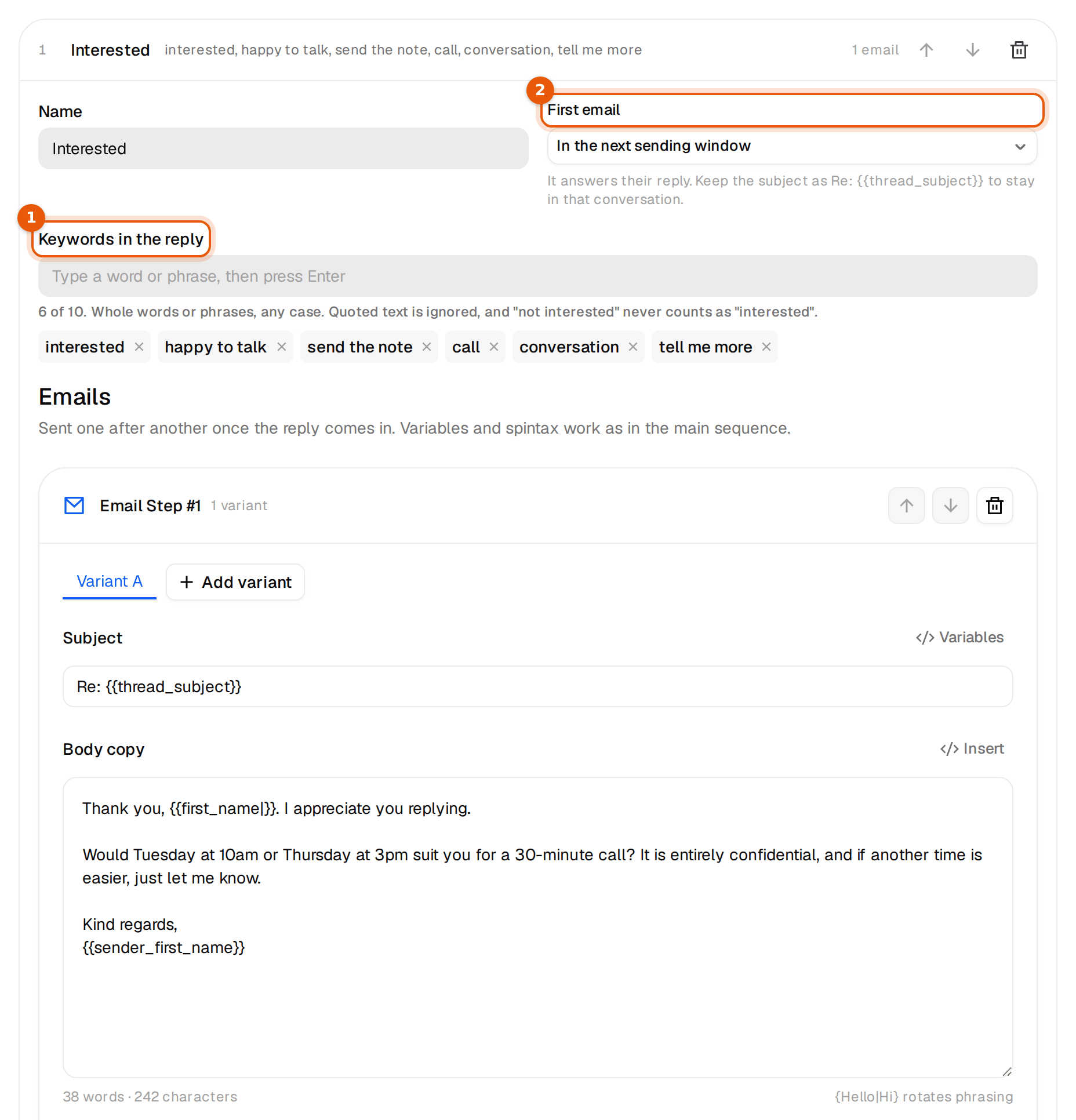
A yes gets answered by the campaign itself, with a subsequence. It starts when a reply contains one of your keywords, takes the person out of the main sequence and answers in the same thread in the next sending window. A reply that says "not interested" or asks you to stop never triggers one.
On the Subsequences tab, add one with these keywords. interested, happy to talk, send the note, call, conversation, tell me more. Most yes replies in this market are cautious, "happy to have a conversation at some point", so include the soft phrases, not only "interested".
Thanks first, then two times, and the word confidential again. A 30 minute slot signals a real conversation, not a pitch.
Many replies here will not be a yes or a no. "Not now, maybe in two years" is a good outcome. Label it Interested, answer by hand with thanks, and put a reminder in your own calendar. Those are the conversations that turn into mandates later.
Every morning, filter the Unibox by Meeting request and Interested. Those are the conversations one answer away from a call. Propose a specific time instead of just a link, and add your booking link as the second option. When the call is set, change the label to Meeting booked so your numbers count it. Answer referrals the same day. Thank them, write to the person they named, and mention who sent you.
If you would rather work from Claude or ChatGPT, your assistant can read the Unibox, sort replies by label and draft answers. Nothing is sent until you confirm. The use case Run it all from Claude or ChatGPT shows how.
What to expect
The ranges below come from our own sending, scaled to 1,500 people. Our healthy campaign, two emails to a valid-only list from mailboxes at 5 cold emails a day, got human replies from 1.3% of the people contacted. Campaigns from overworked mailboxes sat at 0.3%. About one in five human replies says yes, and about one in four points you to a colleague. These are reference points, not promises. Your offer, your segment and your copy move them a lot. The reply rate in Argorant also counts out-of-office notes, so it reads higher. Compare these numbers with the reply rate excl. OOO.
| Number | For 1,500 people |
|---|---|
| Human replies (0.3 to 1.3%) | 5 to 20 |
| Of those, interested | 1 to 4 |
| Referrals to the right person | 1 to 5 |
| Bounces with valid-only addresses | under 1% |
| Booked calls if you answer the same day | 2 to 6 |
Expect the reply rate in this market to sit at the low end, and the replies to be long and personal when they come. A booked call here is a first conversation, often the first time the owner talks about succession with anyone outside the family. Judge the campaign on those conversations over the next year, not on calls in the first month.
On the calendar it looks like this. The first replies arrive in week one, 65% of all replies come within an hour of the email landing and 84% answer the first email. After 6 weeks everyone has had the full sequence, and a week later nearly everything that will come is in. If human replies stay near zero after a few hundred people, check delivery first and copy second.
Do the same from Claude or ChatGPT
Connected to Argorant, your assistant builds the list and checks that each company is still family-owned before anything is spent.
The full setup is in Run it all from Claude or ChatGPT.

 Claude
 Using Argorant