How to Size Your TAM With Live B2B Data
A reproducible method for turning an ICP into account, contact, and reachable-market counts, with dated filters, zero-cost iteration, exclusions, and scenario ranges.
By Argorant
Reviewed and updated August 20, 2026 by Argorant
A defensible TAM is not a single database count. Define the market as filters and exclusions, count companies and buyer roles separately, compare conservative, base, and broad scenarios, and save the exact query with a date. Argorant count and masked-preview tools can test the population before any contact output is purchased.
What works today
Each label shows how a path works today: a direct Argorant connection, a documented setup, a generic HTTP call, a CSV file, or something to check in your own account first.
Live count
DirectUse Argorant search and count tools to measure a current market without revealing contacts.
Masked validation
DirectPreview representative rows to check filter interpretation before using the count.
Official register cross-check
RESTWhere useful, cross-check company counts against official company registers.
Step by step
- 1
Write an ICP as explicit filters
Define industry, geography, company size, keywords, exclusions, buyer titles, and seniority.
Expected result: A query another analyst can reproduce. - 2
Count companies and people separately
Measure target accounts first, then relevant roles per account.
Expected result: Account TAM and contact TAM are not conflated. - 3
Inspect the edges
Preview rows from each region and size band, then adjust ambiguous filters.
Expected result: The count represents the intended market rather than label noise. - 4
Publish scenarios and date
Save conservative, base, and broad counts with query definitions and access date.
Expected result: A transparent range that can be refreshed later.
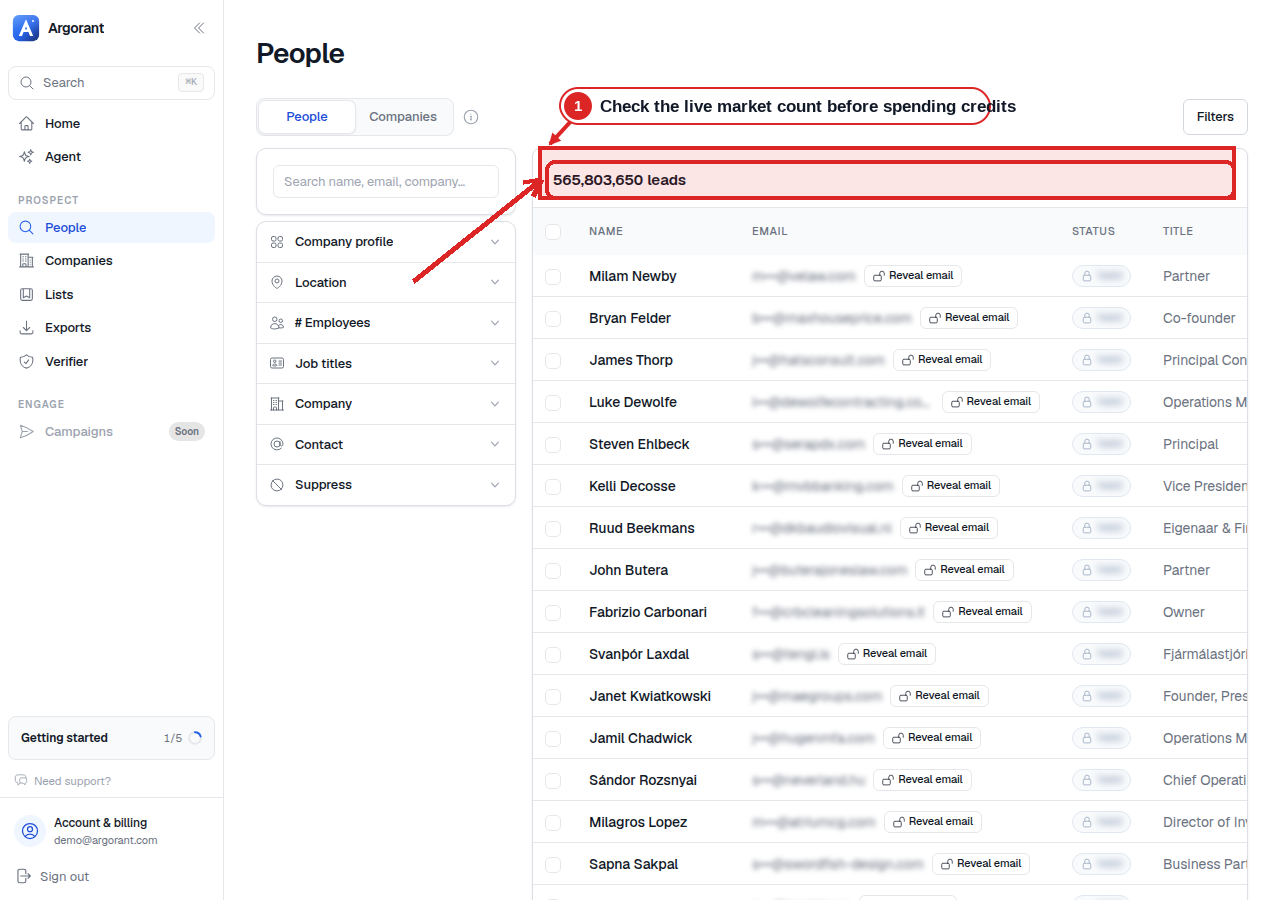
Inspect the market before a paid action
The result count comes first. It lets you or your agent check that the filters describe the right market before any contact is revealed or exported.
Plans, credits, and access gates
| Provider or layer | What to know | Published price |
|---|---|---|
| Argorant | Count and preview for free before any paid reveal or export. | See the vendor's current pricing. |
| Official company registers | Register records can confirm which companies exist, but they do not list current buyers or verified work emails. | See the vendor's current pricing. |
Best fit by job
| Option | Best for | Access | Cost model | Verdict |
|---|---|---|---|---|
| Argorant count | Current B2B company and role population | UI, MCP, API | Discovery before paid output | Primary operational TAM layer. |
| Official company registers | Checking which companies legally exist | Public register websites | Usually free | Useful cross-check, not a source of buyer contacts. |
Frequently asked questions
Is contact TAM the same as account TAM?
No. Account TAM counts companies; contact TAM counts relevant people within them. Report both and avoid multiplying by an assumed contacts-per-account ratio when live role counts are available.
Why save the access date?
Companies and roles change. A dated query lets you repeat the count later and see what moved.
Sources reviewed
Official product, developer, pricing, and policy pages reviewed on August 20, 2026. Prices and plans change, so check the vendor's current page before you buy.
2 sources checked and datedShow sources
Continue the workflow
Prove the workflow
before you scale it.
Count and preview first, then approve verified contacts with a clear spending limit.