Best Hunter alternatives for B2B email finding and contact data.
Hunter is a strong email finder and verifier with Domain Search, Email Finder, Email Verifier, API access, Chrome workflows, Google Sheets, sequences, and MCP. Teams compare Hunter alternatives when they need broader contact coverage, company intelligence, org-chart context, export governance, or a data layer built for AI-agent workflows.
The best Hunter alternative depends on what you are replacing: domain search, name-based email finding, email verification, bulk enrichment, API access, browser lookup, MCP access, outreach sequences, or broader B2B contact intelligence. Start with the job, then test every provider on the same target accounts.
Best fit when the team wants more than email finding. Public pages use aggregate coverage, sample contact examples, and masked previews while real people, emails, phones, profile URLs, and exports are available after sign-in.
A close alternative when the buyer likes Hunter's email-finder motion but wants mobile numbers, public company pages, company enrichment, and a documented MCP path.
A broader alternative when email finding should live with outbound execution, CRM handoff, AI research, and sales engagement workflows.
Relevant when the team wants a lookup-heavy product with a larger public profile surface and phone/email discovery beyond email-only workflows.
Useful when browser capture, CRM enrichment, and outbound handoff matter more than standalone email finding and verification.
Worth testing when the team wants a mature contact lookup extension and broader B2B data workflow than a pure email finder.
Public pricing is only the starting point. Compare plan details, credit rules, and the questions worth confirming before you switch.

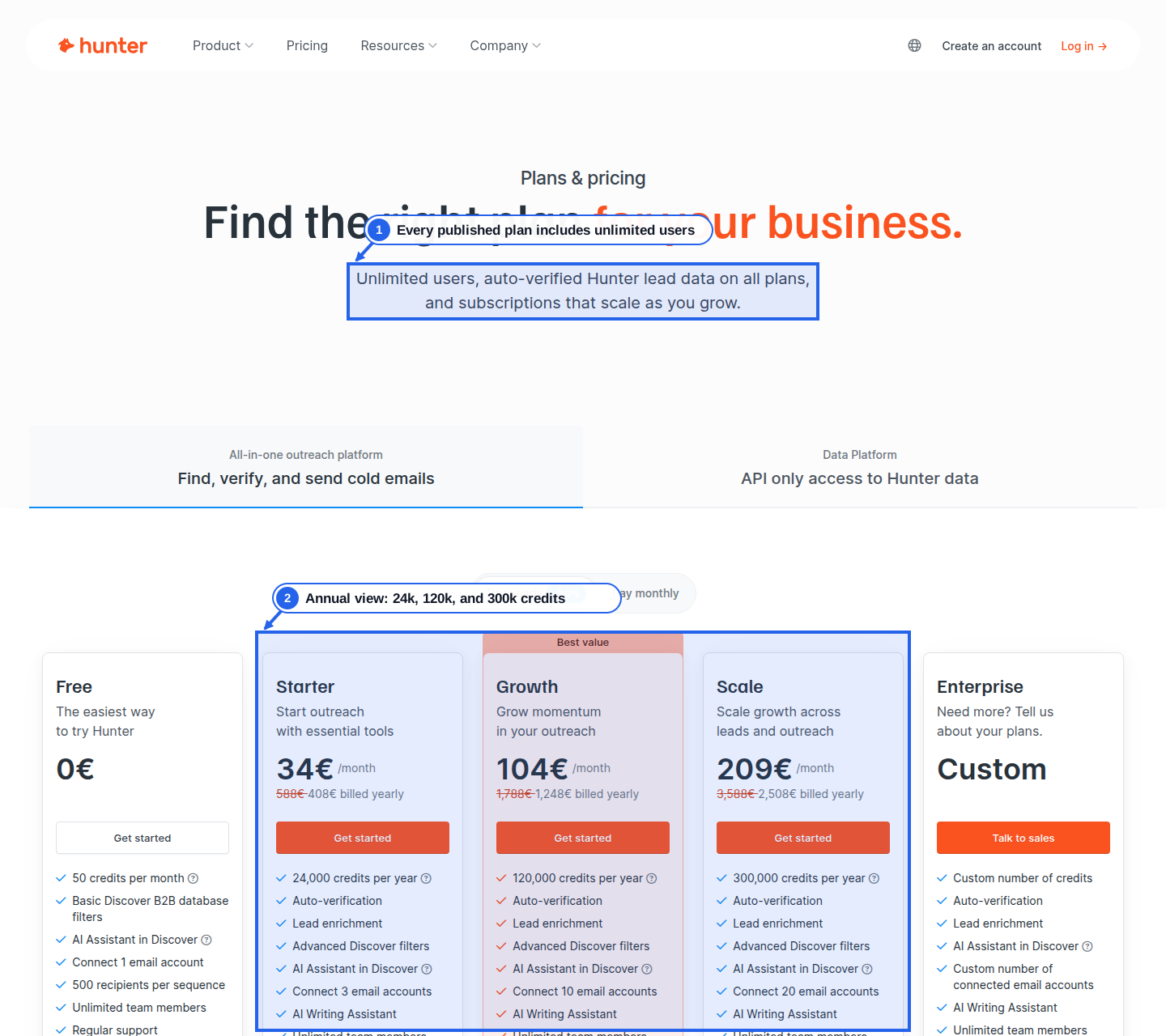
Hunter is transparent for email-led workflows and moves to custom pricing when the buyer needs larger scale or enterprise terms.
Published price versus quote-led terms
Credits and phone/email reveal costs
Export, CRM, API, and MCP access
Coverage quality in your target segment
Cancellation, renewal, and overage language
Hunter is often the right tool when the job is email-specific: find emails behind a domain, find a specific person's professional email, verify deliverability, use a bulk task, or call a simple API. Teams look for alternatives when the job expands beyond email finding into broader account intelligence.
That broader job can include org charts, management coverage, competitors, company facts, role coverage, exports, API workflows, and AI agents. In those cases, the buyer is not replacing Hunter's email tools directly. They are replacing a narrow email lookup workflow with a data layer.

Use one account sample across every provider: 25 companies, three target roles, two countries, and one export destination. Measure domain email coverage, name-based email hit rate, verification status, confidence, title freshness, duplicate records, phone fields, export fields, API behavior, MCP behavior, and credit burn.
Then price only the usable output. Hunter's credit rules are clear for email finding and verification. Alternatives are best judged by cost per usable verified contact, including cleanup time, failed lookups, phone data, exports, API access, CRM handoff, and agent controls.
Choose Argorant when the team needs aggregate company research before signing in. Company pages, email-format pages, org-chart pages, management pages, competitors pages, comparison pages, alternatives pages, and free tools can show useful account context without making real contact details public.
Argorant is also a better fit when AI-agent governance matters. Search and fetch can return masked previews, while reveal contacts, export lists, high-volume usage, and owner and admin controls stay behind account controls.
Hunter may still be better when the team needs a focused email finder, domain search, email verifier, Google Sheets add-on, bulk email tasks, or extension workflow on company websites. The product is clear, well-scoped, and easy to test.
Hunter also has documented API and MCP support. If the buyer's AI workflow is mostly asking an LLM to run Hunter's email-finding and verification API, Hunter can be a direct fit. The diligence is credit behavior, API-key handling, and whether email-only coverage is enough.
Hunter's best public pages answer utility searches: email finder, domain search, email verifier, API, extension, and bulk email finder. That is a strong free-tool pattern and a good lesson for Argorant.
Argorant goes broader while staying safer. Public pages can show aggregate company coverage, sample email examples, masked contact teasers, org-chart signals, competitor lists, and clear sign-in prompts. Real people, full email addresses, direct phones, profile URLs, exports, and automated reveal remain private.
Argorant is the best Hunter alternative when the team wants broader verified-contact coverage, company intelligence, org-chart pages, exports, API access, and OAuth-protected MCP controls. Prospeo, Apollo, RocketReach, LeadIQ, and Lusha fit different workflows.
Common reasons include needing broader contact data, company intelligence, phone fields, org-chart context, privacy-first company pages, cleaner export governance, or AI-agent controls beyond email finding and verification.
Yes. Hunter's official pricing separates Search credits and Verification credits. Email finding costs Search credits, verification costs Verification credits, repeated searches or verifications are counted once per billing period, and team members share the same credit pool.
If Hunter is mainly used for email verification or domain search, supplementing with a broader contact-data layer may be enough. Replace it only after testing the same target-account sample in Hunter and the alternative.
Official pricing page covering Search credits, Verification credits, Free, Starter, Growth, Scale, Enterprise, API, MCP, extension, team sharing, cancellation, and credit counting rules.
Official help article explaining API key authentication, Discover, Domain Search, Email Finder, Email Verifier, enrichment, account information, rate limits, bulk limitations, and credit costs.
Official API reference for Domain Search, Email Finder, Email Verifier, Email Count, enrichment, leads, custom attributes, sequences, test API key, verification fields, and MCP endpoints.
Official Email Finder product page covering email finding by name and domain, verification status, confidence score, sources, bulk lookup, API, Google Sheets add-on, and free-plan usage.
Official extension page describing website-based email discovery, confidence scoring, free-account credits, sources, discovery dates, and the claim that the extension does not scrape page content.
Official help article explaining website lookup, database-indexed email results, save-to-leads, type and department filters, find-by-name, and optional data points like job title, telephone, and social profiles.
Pricing page covering Free, Starter, Growth, and Pro plans, included credits, filters, integrations, API access, team billing, credit expiry, and add-ons.
Official credit rules for verified email reveal, mobile reveal, company enrichment, search pages, no-result behavior, re-enrichment, rollover, and shared team credits.
Official API documentation describing person enrichment, company enrichment, bulk endpoints, people search, company search, account usage, authentication, and rate limits.
Official help article showing different Search and Enrich endpoint limits by plan, plus how successful requests and rate-limited requests are counted.
MCP documentation covering hosted and local setup, enrich and search tools, credit usage, masked previews, and support for MCP-compatible clients.
Official authentication documentation for local API-key mode, hosted OAuth mode, manual OAuth credentials, and direct API-key header access.
Chrome Web Store listing for Prospeo's extension, including rating, user count, publisher, and extension positioning around finding emails and mobile numbers.
Public Prospeo company/email-format page example showing email patterns, company overview, employees, departments, funding, and a conversion path to verified emails.
Public Prospeo company page example showing company facts, email formats, employee distribution, funding, tech stack, trending companies, and FAQ content.
Official pricing entry point; buyers should verify current plan names, credits, add-ons, and contract terms directly with Apollo.
Official explanation of credit usage for emails, phones, enrichment, API usage, AI research, domains, mailboxes, and dialer activity.
Official API overview describing people search, enrichment, company data, OAuth partner flows, and plan-based API access.
Official API pricing note explaining that advanced API access depends on the Apollo plan and that search/enrichment endpoints consume credits.
Official Apollo MCP documentation describing Claude connector workflows, available tools, credit usage, and plan limits.
Official pricing entry point. Buyers should verify the current checkout screen, annual/monthly toggle, team plan terms, exports, API access, and regional differences directly with RocketReach.
Chrome Web Store listing for RocketReach's prospecting extension, including publisher, ratings, user count, and extension positioning.
Third-party 2026 pricing review that cites RocketReach's pricing page and documentation; useful for plan mechanics and annual pricing context, not a substitute for a current quote.
Third-party 2026 guide covering plan tiers, lookup limits, per-seat economics, and annual billing assumptions. Treat figures as directional until verified at checkout.
Third-party 2026 competitor analysis discussing individual plans, team plans, mobile access, API/Salesforce gating, and lookup add-on costs.
Official pricing page showing Free, Pro, and Enterprise packaging, monthly/annual billing, credit mechanics, API access, enrichment, integrations, and AI outbound features.
Official extension positioning around finding prospects, contact data, account details, CRM status, and outbound handoff from the browser.
Official help article describing the LeadIQ Prospecting Hub Chrome extension, side-panel behavior, and install workflow.
Official MCP connector page describing LeadIQ's Claude setup, hosted MCP URL, OAuth login, paid subscription requirement, credit usage, and natural-language prospecting workflows.
Official API documentation covering GraphQL access, people and company queries, API keys, free and paid rate limits, credits, and error handling.
Third-party 2026 pricing guide. Useful for buyer diligence around credit and seat economics, but buyers should verify current LeadIQ pricing directly.
Third-party 2026 pricing summary. Treat plan details as directional and confirm the current billing view or quote before committing.
Official pricing page and FAQ covering free-plan credits, public credit examples, cancellation, rollover, and Scale customization.
Official help article explaining credit categories, API credit consumption, data-point costs, API result costs, bulk-request rules, and rollover behavior.
Official API help article covering API keys, Premium and Scale availability, MCP entry points, credit costs, request minimums, bulk limits, and API key credit caps.
Official MCP guide for Claude, ChatGPT, Cursor, VS Code, and other clients, including OAuth remote MCP, npx setup, tool categories, API-key requirements, and security notes.
Official extension page describing LinkedIn, Sales Navigator, CRM, company-site, save-to-list, CRM handoff, and bulk export workflows.
Official help article explaining where the Chrome and Edge extension works, what it can reveal, and how extension features vary by plan.
Search verified contacts, export a clean list, and see whether Argorant fits your workflow before committing to a larger platform.
Start free