Best Lusha alternatives for B2B contact data.
Lusha is a credible B2B contact-data platform with a strong extension workflow, published credit mechanics, API access, and MCP support. Teams still compare Lusha alternatives when they need different credit economics, broader company intelligence, safer public pages, cleaner exports, or a data layer built for AI-agent governance.
Reviewed and updated August 20, 2026 by Argorant
The right Lusha alternative depends on what you are replacing: browser lookup, LinkedIn/Sales Navigator prospecting, reveal contacts, CRM enrichment, API access, MCP access, verified exports, or account intelligence. Start with the job, then test each vendor on the same target accounts.
Best fit when the team wants a focused data layer instead of only browser lookup. Public pages use aggregate coverage, sample contact examples, and masked previews while real people, emails, phones, profile URLs, and exports are available after sign-in.
A stronger alternative when the buyer wants a daily SDR workspace rather than a narrower contact-data layer. Model credits, API access, and engagement workflow fit carefully.
Relevant when the team wants another lookup-heavy product with a large public footprint and familiar contact-search workflows. Validate lookup/export economics before switching.
Useful when browser capture and CRM handoff matter more than building a standalone data layer. Compare credit behavior and automation rights on the same account sample.
A serious alternative when the team wants transparent credit rules, Chrome lookup, email/mobile enrichment, company search, and existing MCP support.
A heavier alternative when premium data operations, European coverage, compliance posture, and managed enrichment matter more than self-serve lookup.
Public pricing is only the starting point. Compare plan details, credit rules, and the questions worth confirming before you switch.
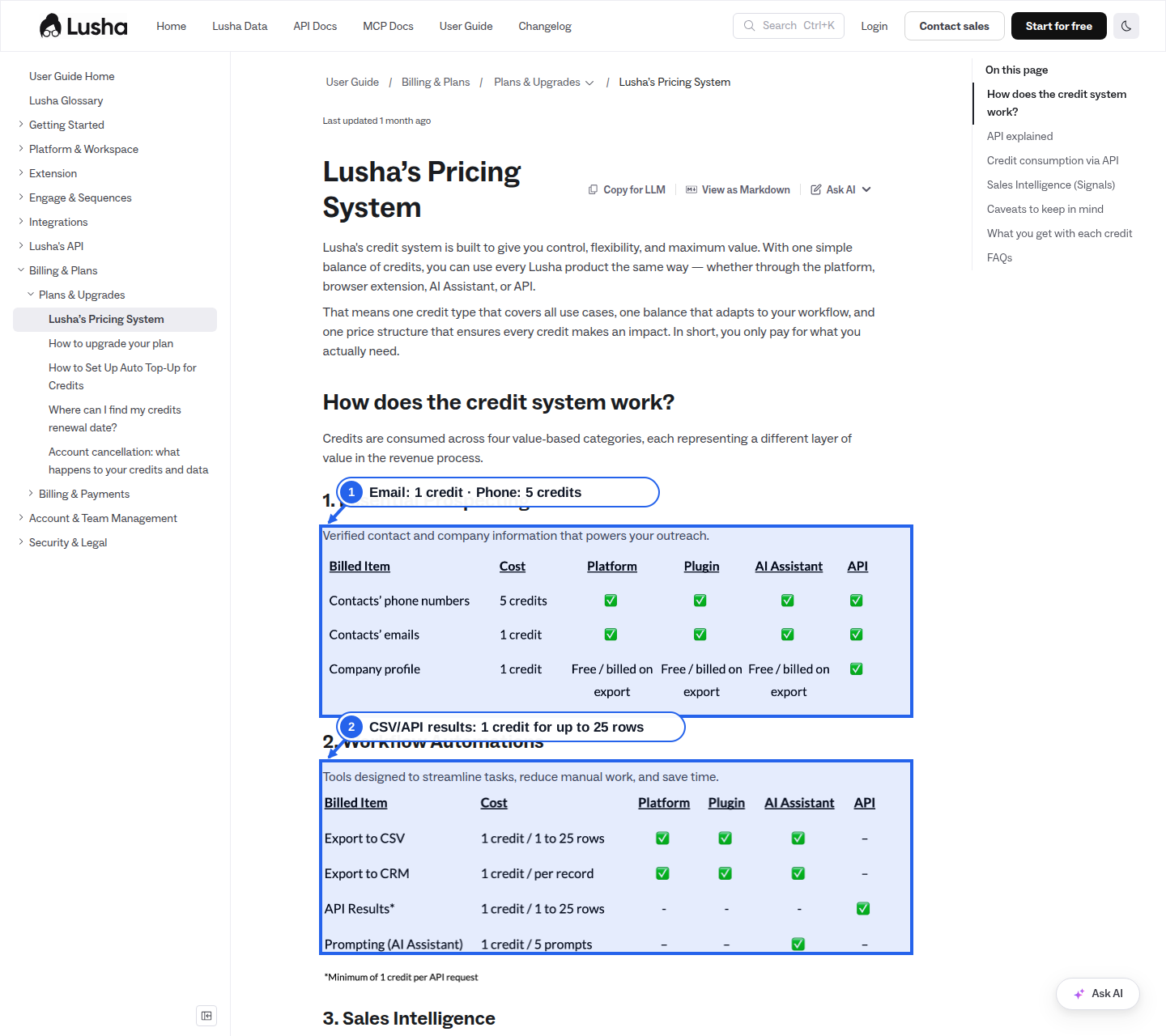
- 1Email: 1 credit · Phone: 5 credits
Lusha's pricing documentation assigns one credit to a contact email and five credits to a contact phone number.
- 2CSV/API results: 1 credit for up to 25 rows
The documented workflow table prices selected CSV exports and API results at one credit for batches of one to 25 rows.
Lusha publishes both monthly and annual self-serve prices and a detailed cross-channel credit table; larger Scale buying still depends on custom credits, seats, API access, and negotiated terms.
Published price versus quote-led terms
Credits and phone/email reveal costs
Export, CRM, API, and MCP access
Coverage quality in your target segment
Cancellation, renewal, and overage language
Lusha is often evaluated for good reasons: it has a recognizable extension workflow, reveal contacts, company data, CRM handoff, API access, and MCP support. The reason to look for alternatives is not that Lusha is weak. It is that the buyer may need a different workflow or a different data boundary.
If the team mainly wants browser lookup inside LinkedIn or a CRM, Lusha may remain a strong fit. If the team wants account research, email-format pages, org-chart pages, verified exports, API access, and AI-agent controls, a focused data layer like Argorant becomes more relevant.

Use one controlled account sample across every provider: 25 companies, three buyer titles, two countries, and one export destination. Measure relevant contacts found, verified emails, phone fields, title freshness, duplicate records, export fields, API behavior, MCP behavior, extension speed, and credit burn.
Then compare cost per usable exported contact. Include email reveal, phone reveal, API request costs, company-data costs, signal costs, duplicate behavior, rollover, exports, CRM sync, and cleanup time. Lusha uses one balance across the platform, extension, AI Assistant, and API, but the unit differs by action: one email costs one credit and one phone costs five.
Lusha's public monthly prices are $49.90 for Starter, $69.90 for Pro, and $399.90 for Premium. Annual billing lowers the displayed monthly equivalents to $37.45, $48.95, and $259.95, with 4,800, 7,200, and 40,800 credits granted for the year. Free includes 40 credits per month, while Scale remains custom.
At full use, Starter works out to about 12.48 cents per credit month-to-month or 9.36 cents on annual billing. Pro is about 11.65 cents monthly or 8.16 cents annually; Premium is about 11.76 cents monthly or 7.65 cents annually. Those annual figures are monthly equivalents of an annual purchase, not cancellable monthly prices.
One verified email therefore uses one of those credits, while one phone uses five, before considering unused allowance or workflow-specific charges. Argorant's agent wallet is $0.035 per contact without a subscription, nominally below Lusha's self-serve per-credit rates. The units are not identical, so compare the same fields and count only usable output.
Lusha supports OAuth connections for Claude, ChatGPT, and Codex, while custom MCP clients can use an API key. MCP does not introduce a separate public wallet: agent actions use Lusha's normal API and credit mechanics.
The published pricing table says API and CSV result batches of one to 25 rows can cost one credit, while contact data points cost one credit for an email and five for a phone. Buyers should test the exact tool call rather than infer costs from the browser product.
Lusha's current documentation contains a point worth resolving before production: its API pricing material describes a one-credit minimum per request even when no result is returned, while MCP troubleshooting material says failed lookups are not charged. Because those statements can produce different budgets, run a no-result test and get the governing rule confirmed for your plan.
Choose Argorant when the team wants company research before signing in. Public company pages, email-format pages, org-chart pages, comparison pages, alternatives pages, and free tools can show useful aggregate coverage without publishing real contact details.
Argorant is also the stronger fit when AI-agent governance matters. Search and fetch can return masked previews, while real contact details, export lists, high-volume usage, and owner and admin controls stay behind account controls.
Lusha may still be better when the team wants an already-mature extension workflow. Its official extension materials describe prospecting on LinkedIn, Sales Navigator, CRMs, Gmail, and company websites, plus saving contacts and sending data into GTM systems.
Lusha may also fit teams that are comfortable with its credit model and want a documented MCP/API path today. The diligence is to confirm exact plan requirements, channel-specific credit rules, API-key limits, and what an AI client can reveal or spend.
A useful public research page does not need to expose real people. It can show aggregate coverage, sample contact examples, masked contact teasers, role coverage, department coverage, company facts, and clear sign-in prompts.
That is the safer Argorant path. Public pages can help buyers understand the account graph, while named people, full email addresses, direct phones, profile URLs, exports, and automated reveal stay private.
Argorant is the best Lusha alternative when the team wants broader verified-contact coverage, company intelligence, org-chart pages, exports, API access, and OAuth-protected MCP controls. Apollo, RocketReach, LeadIQ, Prospeo, and Cognism fit different workflows.
Common reasons include wanting different credit economics, broader account intelligence, privacy-first company pages, cleaner export governance, stricter AI-agent controls, or less dependence on browser lookup.
Yes. One email costs one credit and one phone costs five. The same balance is used across the platform, extension, AI Assistant, and API, with separate rules for API results, bulk requests, rollover, and request minimums.
Lusha does not publish a separate MCP wallet. OAuth or API-key MCP calls use the account's normal API and credit rules, so the cost depends on the fields and result actions the agent requests.
If Lusha is central to daily browser prospecting, supplementing may be safer. If the team mainly needs verified contacts, company intelligence, exports, API access, and agent workflows, a focused data layer can replace more of the workflow after a controlled sample test.
Official pricing page and FAQ covering free-plan credits, public credit examples, cancellation, rollover, and Scale customization.
Official help article explaining credit categories, API credit consumption, data-point costs, API result costs, bulk-request rules, and rollover behavior.
Official API help article covering API keys, Premium and Scale availability, MCP entry points, credit costs, request minimums, bulk limits, and API key credit caps.
Official MCP guide for Claude, ChatGPT, Cursor, VS Code, and other clients, including OAuth remote MCP, npx setup, tool categories, API-key requirements, and security notes.
Official extension page describing LinkedIn, Sales Navigator, CRM, company-site, save-to-list, CRM handoff, and bulk export workflows.
Official help article explaining where the Chrome and Edge extension works, what it can reveal, and how extension features vary by plan.
Official pricing entry point; buyers should verify current plan names, credits, add-ons, and contract terms directly with Apollo.
Official explanation of credit usage for emails, phones, enrichment, API usage, AI research, domains, mailboxes, and dialer activity.
Official API overview describing people search, enrichment, company data, OAuth partner flows, and plan-based API access.
Official API pricing note explaining that advanced API access depends on the Apollo plan and that search/enrichment endpoints consume credits.
Official Apollo MCP documentation describing connectors and plug-ins, available tools, plan permissions, and which agent actions consume normal Apollo credits.
Official API entry point. The current individual pricing table places API access in Ultimate, while custom team plans advertise higher API limits.
Official pricing entry point. Buyers should verify the current checkout screen, annual/monthly toggle, team plan terms, exports, API access, and regional differences directly with RocketReach.
Chrome Web Store listing for RocketReach's prospecting extension, including publisher, ratings, user count, and extension positioning.
Third-party 2026 pricing review that cites RocketReach's pricing page and documentation; useful for plan mechanics and annual pricing context, not a substitute for a current quote.
Third-party 2026 guide covering plan tiers, lookup limits, per-seat economics, and annual billing assumptions. Treat figures as directional until verified at checkout.
Third-party 2026 competitor analysis discussing individual plans, team plans, mobile access, API/Salesforce gating, and lookup add-on costs.
Official pricing page showing Free, Pro, and Enterprise packaging, monthly/annual billing, credit mechanics, API access, enrichment, integrations, and AI outbound features.
Official extension positioning around finding prospects, contact data, account details, CRM status, and outbound handoff from the browser.
Official help article describing the LeadIQ Prospecting Hub Chrome extension, side-panel behavior, and install workflow.
Official MCP connector page describing LeadIQ's Claude setup, hosted MCP URL, OAuth login, paid subscription requirement, credit usage, and natural-language prospecting workflows.
Official API documentation covering GraphQL access, people and company queries, API keys, free and paid rate limits, credits, and error handling.
Third-party 2026 pricing guide. Useful for buyer diligence around credit and seat economics, but buyers should verify current LeadIQ pricing directly.
Third-party 2026 pricing summary. Treat plan details as directional and confirm the current billing view or quote before committing.
Pricing page covering Free, Starter, Growth, and Pro plans, included credits, filters, integrations, API access, team billing, credit expiry, and add-ons.
Official credit rules for verified email reveal, mobile reveal, company enrichment, search pages, no-result behavior, re-enrichment, rollover, and shared team credits.
Official API documentation describing person enrichment, company enrichment, bulk endpoints, people search, company search, account usage, authentication, and rate limits.
Official help article showing different Search and Enrich endpoint limits by plan, plus how successful requests and rate-limited requests are counted.
MCP documentation covering hosted and local setup, enrich and search tools, credit usage, masked previews, and support for MCP-compatible clients.
Official authentication documentation for local API-key mode, hosted OAuth mode, manual OAuth credentials, and direct API-key header access.
Chrome Web Store listing for Prospeo's extension, including rating, user count, publisher, and extension positioning around finding emails and mobile numbers.
Public Prospeo company/email-format page example showing email patterns, company overview, employees, departments, funding, and a conversion path to verified emails.
Public Prospeo company page example showing company facts, email formats, employee distribution, funding, tech stack, trending companies, and FAQ content.
Official pricing entry point covering Standard, Pro, CRM Enrichment, Data-as-a-Service, credits, API/bulk delivery, and quote-led buying.
Official product positioning around premium B2B data, verified contact records, Data-as-a-Service, and API access.
Third-party 2026 comparison; useful for directional buyer diligence, not a substitute for a current Cognism quote.
Third-party 2026 pricing discussion; treat estimates and renewal notes as directional until verified in a contract.
Search for the right buyers, export valid work emails, and see whether Argorant fits your workflow before committing to a larger platform.
Start 7-day trial